.thumb.png.9d49d03b0e808268ad5fdc77d655118d.png)

About EssentialsX - v1.0.0
EssentialsX — the lightweight “essentials” your Rust server actually needs
Give your players the quality‑of‑life features they expect — without bloat. EssentialsX bundles the most-used commands into one clean, configurable plugin,
Teleportation done right: TPA + Homes with warmup, cooldowns, movement/damage cancel, hostile checks.
Kits system: permissions, cooldowns, inventory-space protection, and an admin command to create kits straight from your inventory.
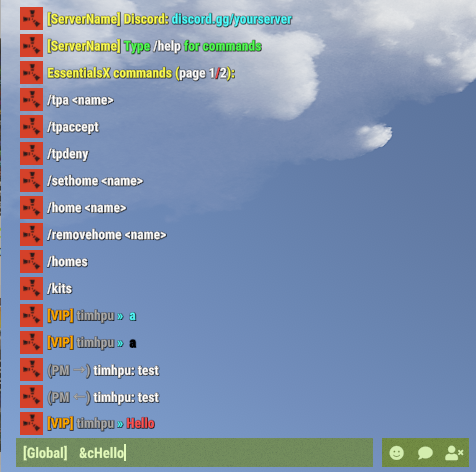
Modern chat experience: configurable chat format with {GROUP}/{NICK}/{MESSAGE}, Minecraft-style & colors, permission-based group tags.
AutoMessages: scheduled server announcements with & colors.
Wipe timer that fits your schedule: weekly / biweekly / monthly wipe schedules.
Admin tools: broadcast announcements and inventory view (/invsee) with view-only mode by default.
Full control: every module can be toggled via Features (enable/disable) and hidden automatically.
Multi-language: all messages live in config and can be edited per language.
Main Features
- TPA teleport requests with timeout, warmup, cooldown, and cancel on movement/damage
- Homes with limits, warmup, cooldown, and cancel on movement/damage
- Kits with per-kit permissions and cooldowns
- Admin kit creation that reads the creator’s inventory and saves it into config
- Private messages (/msg) and quick reply (/r)
- /pop online counter
- /wipe countdown based on a configurable schedule (weekly/biweekly/monthly)
- Admin broadcast messages
- Inventory view (invsee) for admins
- Chat formatting with {GROUP}/{NICK}/{MESSAGE} and Minecraft-style color codes (&0..&f, &r)
- Multi-language messages (EN/RU/PL/ES/DE) via config
- AutoMessages (periodic server messages) via config
MORE FEATURES COMMING SOON! 
Installation
1) Copy the file `EssentialsX.cs` into your server’s plugins folder:
oxide/plugins/EssentialsX.cs
2) Reload or restart the server:
oxide.reload EssentialsX
3) Edit the generated config file:
oxide/config/EssentialsX.json
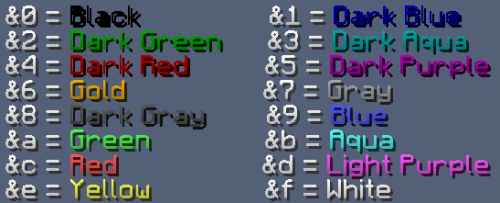
COLOR CODES:
&0 black
&1 dark blue
&2 dark green
&3 dark aqua
&4 dark red
&5 dark purple
&6 gold
&7 gray
&8 dark gray
&9 blue
&a green
&b aqua
&c red
&d light purple
&e yellow
&f white
CONFIG
Default
  "Chat": {
    "Format": "[{GROUP}] <{NICK}> {MESSAGE}",
    "UseMinecraftColors": true,
    "AllowPlayerMessageColors": true,
    "PermissionPrefixes": [
      {
        "Permission": "essentialsx.prefix.admin",
        "Prefix": "<color=#FF5555>ADMIN</color>",
        "Priority": 100
      },
      {
        "Permission": "essentialsx.prefix.vip",
        "Prefix": "<color=#FFAA00>VIP</color>",
        "Priority": 10
      }
    ]
  },
Modern example:
  "Chat": {
    "Format": "{GROUP} &7{NICK} &b» &7{MESSAGE}",
    "UseMinecraftColors": true,
    "AllowPlayerMessageColors": true,
    "PermissionPrefixes": [
      {
        "Permission": "essentialsx.prefix.admin",
        "Prefix": "<color=#FF5555>[ADMIN]</color>",
        "Priority": 100
      },
      {
        "Permission": "essentialsx.prefix.vip",
        "Prefix": "<color=#FFAA00>[VIP]</color>",
        "Priority": 10
      }
    ]
  },
Example of language coloring:
default
"Help.Header": "EssentialsX commands (page {0}/{1}):",
Custom
"Help.Header": "&eEssentialsX commands (&fpage {0}&c/&f{1}&e):",
Languages (Server-wide)
- Set the server language in config:
Language: "en" | "ru" | "pl" | "es" | "de"
- All plugin messages will use the selected language.
Player Commands
TPA
- /tpa <name>
Sends a teleport request to another online player.
- /tpaccept
Accepts the pending request (teleports the requester to you).
- /tpdeny
Denies the pending request.
Notes (TPA)
- Requests expire after a configurable timeout.
- Teleport uses warmup time (countdown).
- Teleport can be cancelled if the teleporting player moves too far.
- Teleport can be cancelled if the teleporting player takes damage/hostile.
- Cooldowns are saved and survive restarts.
Homes
- /sethome <name>
Saves your current position as a home.
- /home <name>
Teleports you to the selected home.
- /removehome <name>
Removes an existing home.
- /homes
Lists your homes.
Notes (Homes)
- Home limit can be configured and can also be increased by permission.
- Teleport uses warmup time (countdown).
- Teleport can be cancelled on movement/damage.
Kits
- /kits
Shows kits you can use (based on permissions).
- /kit <name>
Redeems a kit.
Notes (Kits)
- Each kit can have:
- Items (with amount, skin, condition, attachments/contents where supported)
- Per-kit permission
- Cooldown
- Kit cooldowns are saved and survive restarts.
Messaging
- /msg <name> <message>
Sends a private message to another online player.
- /r <message>
Replies to the last player you messaged (or who messaged you).
Info Commands
- /pop
Shows online player count.
- /wipe
Shows time remaining until next wipe (from config).
- /help [page]
Shows available player commands (paged).
- /help admin [page]
Shows available admin commands (paged).
Admin Commands
Broadcast
- /broadcast <text>
Sends a server-wide announcement with a configurable prefix.
Permission: essentialsx.admin.broadcast
Invsee
- /invsee <name>
Opens the target player’s inventory for viewing (view-only by default).
Permission: essentialsx.admin.invsee
Create Kit (from inventory)
- /createkit <name> <cooldownSeconds>
Reads your current inventory (main/belt/wear) and creates/overwrites a kit in config.
A permission is automatically created for the kit using the configured prefix.
Permission: essentialsx.admin.createkit
Permissions Summary
- essentialsx.admin.broadcast
- essentialsx.admin.invsee
- essentialsx.admin.createkit
- essentialsx.chat.colors
- essentialsx.prefix.admin
- essentialsx.prefix.vip
Config Overview (Important Keys)
Language
- Language: "en" (default)
Supported: en / ru / pl / es / de
Translations / Messages
- UseMinecraftColorsInMessages
If true, translation strings can use Minecraft color codes (&0..&9, &a..&f, &r). Use && for a literal &.
- Messages
All translation strings are stored in config.
Wipe
- Wipe.Mode: "weekly" | "biweekly" | "monthly"
- Wipe.TimeZoneOffsetMinutes: 0
- Wipe.Weekly.DayOfWeek: "Thursday"
- Wipe.Weekly.Hour: 16
- Wipe.Weekly.Minute: 0
- Wipe.BiWeekly.AnchorUtc: "2026-01-01T14:00:00Z" (used when Mode = biweekly)
- Wipe.Monthly.Day: 1
- Wipe.Monthly.Hour: 20
- Wipe.Monthly.Minute: 0
Chat Prefix
- Chat.Format
Supports Minecraft-style color codes (&0..&9, &a..&f, &r) and placeholders: {GROUP}, {NICK}, {MESSAGE}
- Chat.UseMinecraftColors
If true, color codes in Chat.Format are converted to Rust <color=#...> tags.
- Chat.AllowPlayerMessageColors
If true, players with permission essentialsx.chat.colors can color their own message by typing & codes (e.g. "&2Hejka").
- Chat.PermissionPrefixes
List of permission-based group tags (used for {GROUP}) with priority.
Features (enable/disable)
- Features (enable/disable)
Toggle each module on/off. Disabled features do not work and are hidden from /help.
Teleport (TPA)
- Teleport.RequestTimeoutSeconds
- Teleport.WarmupSeconds
- Teleport.CooldownSeconds
- Teleport.BlockIfHostile
- Teleport.CancelOnDamage
- Teleport.CancelOnMoveDistance
- Teleport.SleepBeforeTeleportSeconds
- Teleport.SleepAfterTeleportSeconds
Home
- Home.WarmupSeconds
- Home.CooldownSeconds
- Home.BlockIfHostile
- Home.CancelOnDamage
- Home.CancelOnMoveDistance
- Home.SleepBeforeTeleportSeconds
- Home.SleepAfterTeleportSeconds
- Home.DefaultLimit
- Home.LimitsByPermission
Kits
- Kits.PermissionPrefix (default: "essentialsx.kit.")
- Kits.KitDefinitions
Messaging
- Messaging.SentPrefix
- Messaging.ReceivedPrefix
Broadcast
AutoMessages
- Features (enable/disable).AutoMessages
- AutoMessages.IntervalSeconds
- AutoMessages.Random
- AutoMessages.MinOnline
- AutoMessages.UseMinecraftColors
- AutoMessages.Messages
- Broadcast.Prefix
Invsee
- Invsee.TimeoutSeconds
- Invsee.AllowModify