

.thumb.png.dc682eadc1e5d61faf2a085e305630a9.png)
Works with
Compatible add-ons, packages, or tools that pair well with this resource.
-
Rust Server List | Rust Multiplayer Servers Optional
-
 Rust Servers | Find the Best Vanilla, Modded & Just Wiped Servers Optional
 -
The Best Multiplayer Game Servers | Best Servers Optional
-
Just a moment... Optional
-
 Top Games - Game servers ranking, Best game servers Optional
 -
Just a moment... Optional
About EasyVoteExtended
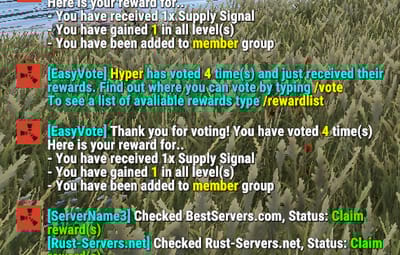
Easy Vote Extended is an upgraded version of Easy Vote, the most advanced and versatile voting plugin available, designed to enhance player engagement and community interaction effortlessly.
The plugin includes automatic vote claiming, configurable rewards, per-player language support, Discord announcements, multiple-server support, persistent pending rewards, claim recovery with administrator review, protected data writes, seven built-in voting sites, and support for compatible custom vote trackers.
A player does not need to run /claim after voting. Votes are checked and claimed automatically when the player connects, when the configured sleep-ended check runs, during periodic checks for online players, or shortly after /vote is used. The /claim command remains available as an optional manual check.
Supported Voting Sites:
The default configuration includes:
- Rust-Servers.net
- Rustservers.gg
- BestServers.com
- GamesFinder.net
- Top-Games.net
- TrackyServer.com
- RustServerList.com
Compatible custom voting sites can also be added through the configuration.
Chat Commands:
- /vote - Display the configured vote link or links and schedule an automatic vote check.
- /claim - Manually check all configured voting sites. Claiming is otherwise automatic.
- /rewardlist - Display the currently configured vote rewards.
Server Commands:
- eve.clearvote <steamid|username> - Reset a player's vote count to 0 and clear their pending claims and rewards.
- eve.checkvote <steamid|username> - Display a player's current vote count.
- eve.setvote <steamid|username> <amount> - Set a player's vote count to a specific number.
- eve.resetvotedata - Reset all stored vote counts.
- eve.resetvotedata - Reset all stored vote counts and clear all pending claims and rewards.
- eve.pending [steamid|username] - Display pending claim transactions, optionally filtered by player, with their IDs, states and review reasons. Up to 50 entries are shown.
- eve.resolve <transactionid> <retry|grant|discard> - Resolve a claim transaction awaiting manual review.
These commands are available only from the server console or RCON. Use the transaction ID shown by `eve.pending` with `eve.resolve`:
- retry - Reset retry counters and resume processing, checking the tracker status first if the previous result was uncertain.
- grant - Confirm the vote locally and process its vote count and configured rewards without contacting the tracker.
- discard - Close the transaction without awarding it. This does not change the vote status on the tracker.
Only transactions in ManualReview with no active request can be resolved. Use grant only after verifying the external result: it does not mark the vote as claimed on the tracker, so an unclaimed external vote could be rewarded again later.
eve.setvote changes only the stored counter and refuses changes while an unfinished transaction has an assigned target vote count.
Configuration:
{
  "Configuration Version": 1,
  "Debug Settings": {
    "Debug Enabled?": "false",
    "Enable Verbose Debugging?": "false",
    "Set Check API Response Code (0 = Not found, 1 = Has voted and not claimed, 2 = Has voted and claimed)": "0",
    "Set Claim API Response Code (0 = Not found, 1 = Has voted and not claimed. The vote will now be set as claimed., 2 = Has voted and claimed": "0"
  },
  "Plugin Settings": {
    "Enable logging => logs/EasyVoteExtended (true / false)": "true",
    "Wipe Rewards Count on Map Wipe?": "false",
    "Vote rewards cumulative (true / false)": "false",
    "Chat Prefix": "<color=#e67e22>[EasyVote]</color> "
  },
  "Notification Settings": {
    "Globally announcment in chat when player voted (true / false)": "true",
    "Enable the 'Please Wait' message when checking voting status?": "true",
    "Notify player of rewards when they stop sleeping?": "false",
    "Notify player of rewards when they connect to the server?": "true",
    "Automatic vote check interval for online players (seconds, 0 to disable)": "300",
    "Vote follow-up check delay after using /vote (seconds, 0 to disable)": "60"
    },
  "Discord": {
    "Discord webhook (URL)": "https://support.discord.com/hc/en-us/articles/228383668-Intro-to-Webhooks",
    "DiscordMessage Enabled (true / false)": "false",
    "Discord Title": "A player has just voted for us!"
  },
  "Rewards": {
    "@": [
      "inventory.giveto {playerid} supply.signal 1"
    ],
    "first": [
      "inventory.giveto {playerid} stones 10000",
      "sr add {playerid} 10000"
    ],
    "3": [
      "addgroup {playerid} vip 7d"
    ],
    "6": [
      "grantperm {playerid} plugin.test 1d"
    ],
    "10": [
      "zl.lvl {playerid} * 2"
    ]
  },
  "Reward Descriptions": {
    "@": "1 Supply Signal",
    "first": "10000 Stones, 10000 RP",
    "3": "7 days of VIP rank",
    "6": "1 day of plugin.test permission",
    "10": "2 zLevels in Every Category"
  },
  "Server Voting IDs and Keys": {
    "ServerName1": {
      "Rust-Servers.net": "ID:KEY",
      "Rustservers.gg": "ID:KEY",
      "BestServers.com": "ID:KEY",
      "GamesFinder.net": "ID:KEY",
      "Top-Games.net": "ID:KEY",
      "TrackyServer.com": "ID:KEY",
      "RustServerList.com": "ID:KEY"
    },
    "ServerName2": {
      "Rust-Servers.net": "ID:KEY",
      "Rustservers.gg": "ID:KEY",
      "BestServers.com": "ID:KEY",
      "GamesFinder.net": "ID:KEY",
      "Top-Games.net": "ID:KEY",
      "TrackyServer.com": "ID:KEY",
      "RustServerList.com": "ID:KEY"
    }
  },
  "Server Vote Custom link": {
    "ServerName1": "https://vote.servername1.com"
  },
  "Voting Sites API Information": {
    "Rust-Servers.net": {
      "API Claim Reward (GET URL)": "https://rust-servers.net/api/?action=custom&object=plugin&element=reward&key={0}&steamid={1}",
      "API Vote status (GET URL)": "https://rust-servers.net/api/?object=votes&element=claim&key={0}&steamid={1}",
      "Vote link (URL)": "https://rust-servers.net/server/{0}",
      "Site Uses Username Instead of Player Steam ID?": "false"
    },
    "Rustservers.gg": {
      "API Claim Reward (GET URL)": "https://rustservers.gg/vote-api.php?action=claim&key={0}&server={2}&steamid={1}",
      "API Vote status (GET URL)": "https://rustservers.gg/vote-api.php?action=status&key={0}&server={2}&steamid={1}",
      "Vote link (URL)": "https://rustservers.gg/server/{0}",
      "Site Uses Username Instead of Player Steam ID?": "false"
    },
    "BestServers.com": {
      "API Claim Reward (GET URL)": "https://bestservers.com/api/vote.php?action=claim&key={0}&steamid={1}",
      "API Vote status (GET URL)": "https://bestservers.com/api/vote.php?action=status&key={0}&steamid={1}",
      "Vote link (URL)": "https://bestservers.com/server/{0}",
      "Site Uses Username Instead of Player Steam ID?": "false"
    },
    "GamesFinder.net": {
      "API Claim Reward (GET URL)": "https://www.gamesfinder.net/api/vote?mode=claim&key={0}&steamid={1}",
      "API Vote status (GET URL)": "https://www.gamesfinder.net/api/vote?key={0}&steamid={1}",
      "Vote link (URL)": "https://www.gamesfinder.net/server/{0}",
      "Site Uses Username Instead of Player Steam ID?": "false"
    },
    "Top-Games.net": {
      "API Claim Reward (GET URL)": "https://api.top-games.net/v1/votes/claim-username?server_token={0}&playername={1}",
      "API Vote status (GET URL)": "https://api.top-games.net/v1/votes/check?server_token={0}&playername={1}",
      "Vote link (URL)": "https://top-games.net/rust/{0}",
      "Site Uses Username Instead of Player Steam ID?": "true"
    },
    "TrackyServer.com": {
      "API Claim Reward (GET URL)": "https://api.trackyserver.com/vote/?action=claim&key={0}&steamid={1}",
      "API Vote status (GET URL)": "https://api.trackyserver.com/vote/?action=status&key={0}&steamid={1}",
      "Vote link (URL)": "https://trackyserver.com/server/{0}",
      "Site Uses Username Instead of Player Steam ID?": "false"
    },
    "RustServerList.com": {
      "API Claim Reward (GET URL)": "https://rustserverlist.com/api/vote?action=claim&key={0}&steamid={1}",
      "API Vote status (GET URL)": "https://rustserverlist.com/api/vote?action=status&key={0}&steamid={1}",
      "Vote link (URL)": "https://rustserverlist.com/server/{0}",
      "Site Uses Username Instead of Player Steam ID?": "false"
    }
  }
}
Unconfigured entries such as ID:KEY, empty IDs, or empty API keys are ignored and do not generate web requests.
Keep Enable Verbose Debugging? disabled on production servers. It overrides voting API response values rather than just enabling extra logging.
Rewards:
Reward keys are optional and can be combined in any configuration:
- @ - Commands executed after every successfully claimed vote.
- first - Commands executed only for the player's first successfully claimed vote.
- Positive numeric keys such as 2, 3, or 10 - Commands associated with that vote count.
Available command placeholders:
- {playerid} - The player's Steam ID.
- {playername} - The player's current display name display name when the reward commands are prepared.
When Vote rewards cumulative is false, only the numeric reward matching the current vote count is executed.
When Vote rewards cumulative is true, every numeric reward whose number is less than or equal to the player's current vote count is executed. The @ reward still runs once per vote, and `first` still runs only on the first vote.
The @, first, and numeric entries may be removed entirely. Empty reward lists and empty commands are ignored safely.
Rewards execute the server commands configured by the administrator. The plugin does not validate whether another plugin or command actually applied the item, currency or permission.
Reward commands are saved as a snapshot when a claim is confirmed. Later configuration changes do not alter those saved commands during recovery. The player must be connected and awake for delivery; their state is checked again before each command.
Automatic Vote Claiming:
The plugin automatically checks and claims votes:
- When a player connects, unless the sleep-ended check is selected instead.
- When a player stops sleeping, if enabled.
- At the configured interval for online players.
- Shortly after the player uses /vote.
- When the player manually uses /claim.
By default, online players are checked every `300` seconds and /vote schedules a check after 60 seconds. The follow-up delay starts when /vote is used, not when voting is completed on the website. Set either interval to 0 to disable that check.
Status and claim requests are queued and spaced apart. Duplicate checks and claims for the same player, server, and voting site are prevented while a request is pending. Vote API requests use a 15-second timeout; manual checks do not bypass an active request or a scheduled retry delay.
If a vote is claimed while the player disconnects, the generated reward commands are stored in oxide/data/EasyVoteExtended_PendingRewards.json in the framework's data directory and delivered once the player is connected and awake. Pending local work is checked every 5 seconds independently of periodic website checks, while scheduled retry delays are still respected.
Claim Recovery and Data Protection:
Uncertain claim results are preserved and checked against the tracker status before another claim is attempted. Transactions that cannot be resolved automatically remain in `ManualReview` for `eve.pending` and `eve.resolve`; further claims for the same player, server and site wait for resolution.
Recovery assumes that only one plugin instance claims a particular external vote. Do not run multiple instances that compete to claim the same vote with the same tracker credentials.
The plugin uses these files in the framework's data directory:
- EasyVoteExtended.json - Player vote counts.
- EasyVoteExtended_PendingRewards.json - Saved reward commands waiting for delivery.
- EasyVoteExtended_PendingClaims.json - Claim transactions, retry information and confirmed reward snapshots.
- EasyVoteExtended_ResetJournal.json - Saved player or full-reset operations that need to finish after an interruption.
Configuration and data writes use temporary files and backups when replacing existing files. Unreadable files are preserved instead of being replaced with empty data or defaults. Voting pauses when safe loading is not possible; repair the files and reload the plugin. A saved reset journal allows an interrupted reset to resume after a reload or restart.
Reward commands are removed from the saved queue before execution to avoid replaying uncertain commands. A crash between saving that removal and executing a command can lose that command. Commands that throw during dispatch are logged and are not replayed automatically.
Back up the configuration, language files and all EasyVoteExtended data files together before updating. Do not delete the pending files or reset journal to force recovery.
Discord Announcements:
Discord announcements use a separate in-memory queue with timeouts, limited retries and rate-limit handling. Automatic mentions are disabled and message length is limited. Discord failures do not rerun reward commands. Queued announcements are not retained after a plugin reload or server restart.
Adding a Custom Voting Site:
A custom tracker must be added to both Voting Sites API Information and the desired server inside Server Voting IDs and Keys.
Example:
  "MyVoteTracker.com": {
    "API Claim Reward (GET URL)": "https://example.com/api/claim?key={0}&player={1}&server={2}",
    "API Vote status (GET URL)": "https://example.com/api/status?key={0}&player={1}&server={2}",
    "Vote link (URL)": "https://example.com/server/{0}",
    "Site Uses Username Instead of Player Steam ID?": "false"
  }
Then add the same tracker name to the server:
  "ServerName1": {
    "MyVoteTracker.com": "SERVER_ID:API_KEY"
  }
The tracker name is matched case-insensitively between the two configuration sections.
API URL placeholders:
- {0} - API key or token.
- {1} - Player Steam ID, or the URL-encoded player name when Site Uses Username Instead of Player Steam ID? is true.
- {2} - Server ID.
Vote-link placeholder:
- {0} - Server ID.
The custom API must return the following plain response values:
- 0 - The player has not voted.
- 1 - The player has voted and the vote has not yet been claimed.
- 2 - The player has already claimed the vote.
The claim endpoint must return 1 when the vote is successfully claimed.
Custom Vote Links:
A value inside Server Vote Custom link replaces the individual tracker links displayed by /vote for that server.
Remove the custom-link entry when you want /vote to display each configured tracker separately.
The key must exactly match the server key in Server Voting IDs and Keys, including capitalization. For example, use ServerName1 in both sections. This only changes the displayed link; keep the tracker IDs and API keys configured for checking and claiming votes.
Languages:
Easy Vote Extended have two languages by default (English and Romanian), but you can add more in Oxide lang folder
API Hooks:
int getPlayerVotes(string steamID)