
Vinni_TV_'s Wishlist
-
.thumb.gif.2ebdafa4e4815b2586cfd0c0e21ea4d5.gif)
$20.00
Smart Kill Log
By NINJA WORKS in Plugins
Smart Kill Log
✅Features
- Global Kill Log: Server-wide kill feed displayed to all connected players
- Smooth Animations: Professional slide-in and slide-out effects with easing (FPS depends on the server)
- Personal Notifications: Center-screen zoom notifications when you kill or down someone
- Sound Effects: Audio feedback for kills and downs
- Customizable Position: Display on left or right side of screen, adjustable vertical position
- Opacity Fade: Older entries gradually fade out for cleaner visuals
- NPC Support: Tracks kills involving NPCs (scientists, animals, etc.)
- Multi-language Support: English, Japanese, Chinese , Russian, French
- Custom Background Images: Fully customizable UI backgrounds via ImageLibrary
✅Kill Log Display
The kill log shows detailed information for each event:
- Attacker name (gold color for players, white for NPCs)
- Action type: killed (red), downed (blue), died (purple)
- Victim name
- Weapon used
- Distance in meters
✅Personal Notifications
When you kill or down another player, a centered notification appears with:
- Zoom-in animation effect
- The victim's name highlighted
- Action type (Killed/Downed)
- Sound effect feedback
✅Dependencies
ImageLibrary (for custom background images)
If ImageLibrary is not installed, the plugin works without background images.
✅Commands
/killlog Toggles the display of the kill log on/off.
/killlog notif Toggles the display of kill notifications on/off.
- These settings persist even after restarting the server.
✅Configuration
{ "Kill Log Settings": { "Enabled": true, "Max Logs": 8, "Display Duration (seconds)": 10.0, "Position (Right or Left)": "Right", "Position Y (0.0-1.0, 0.5=center)": 0.83, "Font Size": 12, "Fade Opacity": true, "Show Weapon and Distance": true, "Show Player vs NPC Kills": true, "Show NPC vs Player Kills": true, "Show NPC vs NPC Kills": true, "Show Suicide Kills": true }, "Kill Notification Settings": { "Enabled": true, "Display Duration (seconds)": 1.5, "Position Y (0.0-1.0, 0.5=center)": 0.4, "Font Size": 14 }, "Image Settings": { "Kill Log Background Image URL (Right)": "https://www.dropbox.com/scl/fi/phjuyg4zcm3f0w4maaupi/.png?rlkey=woo4to4ree1taaly5z6euahup&st=a47ypflv&dl=1", "Kill Log Background Image URL (Left)": "https://www.dropbox.com/scl/fi/27x7nr9y77eoaq40ybvgb/.png?rlkey=392e8qmzgdmadu9812y1f1psm&st=0j6yvfyv&dl=1", "Kill Notification Background Image URL (Center)": "https://www.dropbox.com/scl/fi/y0j8alca59m7eqnluwhr0/.png?rlkey=u8mk5qajmr6oqnb41dulorpz5&st=9ocyqggb&dl=1" }, "Color Settings": { "Player Name Color (hex)": "#ffd700", "NPC Name Color (hex)": "#ffffff", "Weapon/Distance Color (hex)": "#f5f5f5", "Killed Action Color (hex)": "#f08080", "Downed Action Color (hex)": "#87cefa", "Died Action Color (hex)": "#dda0dd", "Notification Player Name Color (hex)": "#ff8c00", "Notification NPC Name Color (hex)": "#ff8c00", "Notification Action Text Color (hex)": "#EAE2DA" } }
Kill Log Settings:
- Max Logs: Maximum number of entries displayed at once (default: 😎
- Display Duration: How long each entry stays visible (default: 10 seconds)
- Position: Screen side for the kill log (Right or Left)
- Position Y: Vertical position (0.0 = bottom, 1.0 = top, 0.5 = center)
- Fade Opacity: Gradually fade older entries
- Show Settings : Display settings for NPC and player kill events
Kill Notification Settings:
- Display Duration: How long the center notification shows (default: 1.5 seconds)
- Position Y: Vertical position for the notification
Image Settings:
- Provide URLs to custom PNG images for backgrounds
- Separate images for left/right positioning and center notification
✅Contact
VOID / NINJA WORKS
DISCORD : https://discord.gg/U8uxePjSyA
MADE IN JAPAN
-

$14.99
DropBags
By Whispers88 in Plugins
Drop Bags tracks items dropped into the rust world. When there are high-volume drops, they are combined into a single "drop bag.” This method enhances performance by streamlining the handling of item drops and reducing item physics.
Stop server stalls and freezing from item spam Works on craft spam, dropped item spam, gutted shark spam and horse dung! Light weight and easy to use Easy config
DropBags uses one light weight hook to track dropped items. Dependent on how many items are dropped in a given radius those items get placed into a drop bag. This stops mass item spam effecting your server performance.
{ "Area Size - How far away items can be moved into a container": 7, "Max drops before moving items to container": 36, "Time to wait before moving items": 5.0, "Vischeck - checks items are visable before moving to container": true, "Calculate despawntime from drop bag items": true, "Reset dropbag despawn time on loot": false, "Override drop bag despawn time (seconds), 0 = false": 0.0 }
- #dropbags
- #drop bags
- (and 26 more)
-

$14.99
Update Checker Bot
By Magic Services in Discord Bots
Effortlessly manage plugin updates across all your Rust Servers with a single command. Upload files to a Discord thread and watch them
instantly sync across your servers, with full support for Oxide and Carbon, and any OS. Also allowing any trusted Staff Members to use
FEATURES
Effortlessly check for required updates across all your Rust servers via RCON, with minimal server overhead. Fully Compatible with Oxide and Carbon, and works seamlessly on both Windows and Linux. Optional Automatic Update Checks on a timer schedule that fits your needs. Easy-to-use Buttons that quickly direct you to the plugins needing an update. A Dedicated Upload Thread to send plugins directly to the server(s). Smart Server Separation: Upload all plugins in a single thread, with automatic delivery, to the servers that need the update. File Validation to ensure only plugin files from the update list are uploaded and sent. Easily add as many servers as you want - just configure them in the "SERVERS" folder. Supports a wide range of plugin sites: uMod, Codefling, Lone.Design, Chaos Code, RustWorkshop, ModPulse, RustPlugins, ImperialPlugins, MyVector, SkyPlugins, Game4Freak. Simple one button press updates for plugins hosted on uMod.org and codefling! MAIN CONFIGURATION
{ "BOT_ID": "DiscordBotClientID", "DISCORD_TOKEN": "https://discord.com/developers/applications", "CODEFLING_API_KEY": "https://codefling.com/settings/apps/", "GUILDS": ["DiscordServerID"], "AUTO_UPDATE_CHECK": true, "COMMANDS_ROLES": ["RoleID"], "UPDATE_CHANNEL": "ChannelID", "UPDATE_CHECK_FREQUENCY": 60, "EMBED_HEX": "0099FF", "GLOBAL_EXCLUDED_PLUGINS": [ "" ] } SERVER(S) CONFIGURATION
{ "ENABLED": true, "TYPE": "Oxide", "NAME": "", "IP": "", "RCON_PORT": 28016, "RCON_PASS": "", "EXCLUDED_PLUGINS": [ "" ] } APPRECIATION
Thank you @Pho3niX90 for making the Server Armour API which supports this bot. Thank you @shady14u for his help making the Magic Updater plugin which does the automatic plugin updating. Thank you @KevinX8 for his help making the Bot. -
$17.99
Zen Mail
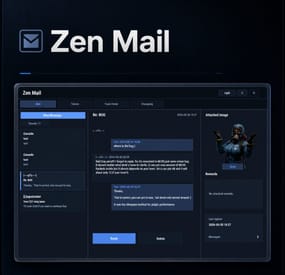
Zen Mail is an in-game mail and notification system for Rust servers, allowing players to send “emails” to online and offline players. Admins will also benefit from being able to include attachments such as items, commands, and economy rewards. With permission, players can also attach images via URL.
Designed for wipes, announcements, rewards, crash compensation, support, and direct communication, Zen Mail ensures both online and sleeping players receive admin messages, while also providing threaded conversations—replies are appended to the original message, so players can follow the full back-and-forth via a simple UI they can access at any time.
Perfect For
Admin announcements Server rules and new player welcome messages Compensations Reward delivery Event prizes Player to Player communication
Core Features
Persistent inbox per player
Messages are delivered even when players are currently offline Configurable inbox limits per player - oldest message deleted if limit exceeded. Optional wipe-based inbox clearing Simple message creation
Ability to input subject and message content Recipient can be easily selected via a player picker UI, with unique colors and tags for Online/Sleeper/Staff Images can be attached to messages through either image URLs pre-configured, or by supplying an image URL (permission required) Clean scrollable UI and configurable max length for long messages. Admins can easily include a combination of items, economies, or commands ran against the recipient. Messages and attachments can also be created via console commands, perfect for use in other plugins. Unread notifications
Notification delivery and visual/audible cue driven by Zen Panel
Attachments & Rewards
Each message can include any combination of:
Item rewards Multiple items per message Custom display names Optional skin IDs Inventory-safe claiming Image from a pre-configured list or directly via an image URL Command rewards
Ability to run server commands on claim Supports placeholders to ensure command is run against the recipient (%steamid%) Repeatable command execution via amount entry Economy rewards
Economics ServerRewards TCBank each handled independently, with clear failure feedback if unavailable or failed Players claim attachments directly from the inbox with a single click
Admin & Console Tools
Send messages with attachments:
Using In-game UI Using Console commands Attach items and pre-configured images using simple flag-based commands Ability to include item/command/economy attachments is admin permission based Target:
Individual players All players (Online and Sleepers) Online players only
Customization/Config
Customize HUD icon and unread indicators via Zen Panel Configure which user groups are displayed as Staff Add pre-configured images (samples included) Configure max subject/message lengths Configure maximum amount of threads for a player inbox to hold Configure if messages are cleared on server wipe.
Chat Commands:
/inbox - Opens the Inbox UI where players can view and send/reply messages
/sendmail "PlayerName" - optional chat command to send message to specific player without going through inbox/player picker
/inbox_top - Admin command to view players with largest inbox sizes
/inbox_clear "PlayerName" - Admin command to clear a specific player's inbox
Permissions:
zenmail.send - required to be able to send messages
zenmail.admin - required to add attachments via UI and run admin commands
zenmail.imageurl - required to attach images through a URL
🤖 Console command functionality
Console commands can be used for both messaging and attachment delivery using flags, with included option to select which image will appear in the message
Basic command structure is as follows:
mail.send <playername OR SteamID> "<subject>" "<content>" [flags] mail.sendall "<subject>" "<content>" [flags] Available flags are desribed below and may be used multiple times and in any order:
Image Flag:
-img <number> Sets the message image.
Uses the image list from the config Index starts at 0 0 = first image, 1 = second, etc. _______________________________
Item Flag:
-item <shortname> <amount> <skinId> optional:"displayName" Adds an item attachment.
skinId may be 0 Custom name is optional If omitted, the item’s default name is used _______________________________
Commands Flag:
-cmd "<name>" "<command>" <amount> Runs a server command when claimed.
amount specified how many time to run the command. It defaults to 1 Supports %steamid% and %name% wildcards - useful when sending to all players or via other plugins. "name" is what the player will see as the attachment name (instead of seeing the command itself) _______________________________
Economy Flag:
-eco <type> <amount> Adds a currency attachment.
Supported types: Economics ServerRewards TCBank _______________________________
❔Example Console Commands:
Below are some example console commands.
Note you can use \n\n for following text to start as a new paragraph Simple message only to single player(with image)
mail.send PlayerName "Welcome!" "Welcome to the server. Enjoy your stay!" -img 0 Simple message only to all players (with image)
mail.sendall "Server Notice" "Welcome to the server everyone!" -img 0 Single item attachment (with image)
mail.send PlayerName "Resource Gift" "Here are some materials to get you started." -img 1 -item wood 2000 0 Item attachment with custom display name and specific skinID (with image)
mail.send PlayerName "Special AK" "You have received skinned HV pistol ammo." -img 2 -item rifle.ak 1 987654321 "Very Cool AK" Multiple items (with image)
mail.send PlayerName "Supply Drop" "A mix of useful resources." -img 0 -item wood 3000 0 -item stones 2000 0 -item metal.fragments 500 0 Command attachment (with image)
mail.send PlayerName "Starter Kit" "Claim this message to receive your starter kit." -img 1 -cmd "Starter Kit" "kit give %steamid% starter" Economy reward (Economics) (with image)
mail.send PlayerName "Welcome Bonus" "You have received a currency reward." -img 0 -eco Economics 1000 Mix of Items + Economics (with image)
mail.send PlayerName "Builder Pack" "Resources and money to help you build." -img 2 -item wood 4000 0 -item stones 4000 0 -eco Economics 2500 Mix of Items and Command (TWO vip kits) (with image)
mail.send PlayerName "VIP Trial" "Enjoy a one time VIP kit." -img 1 -item scrap 250 0 -cmd "VIP Kit" "kit give %steamid% VIP" 2 Full mixed attachments (items + command + economy) (with image)
mail.send PlayerName "Welcome Package" "Everything you need to get started." -img 0 -item wood 3000 0 -item ammo.pistol.hv 100 0 -cmd "Starter Kit" "kit give %steamid% starter" -eco Economics 1500 Full mixed attachments to all players (note using \n\n to create a new paragraph within message content) (with image)
mail.sendall "Attention Citizens!" "Thank you for being awesome.\n\nAttached some gifts." -img 0 -item wood 3000 0 -item ammo.pistol.hv 100 0 -cmd "Starter Kit" "kit give %steamid% starter" -eco Economics 1500
If using the commands within a JSON (config) file, you will need to ensure you escape the quotes with a backslash (place a backslash before any quote sign), for example:
mail.send %SteamID% \"Welcome!\" \"Welcome to the server!\n\n This is a mail system used to message online and offline players and for admins to share important information, changes or updates during the wipe\n\nWe hope you have a great time\" -item ammo.pistol.hv 100 0 \"\" -img 1
If you’re looking for a modern replacement for chat spam, manual kit commands, or unreliable reward delivery, Mail System provides a polished, user-friendly solution that players will instantly understand and appreciate.
I have done my best to document the full functionality, but if any doubt do not hesitate to open a support request.
-
$15.00
CorpseCallBack
Corpse call back RUST plugin preview
It can be customized, you can choose a payment method and amount, and the cooldown time can also be set. Great plugin for PVP or even PVE servers!
Detailed properties:
– Permission for Vip players (Vip cost in config)
– Added Shop and Kit payback value
– Added Economic and Serverrewards payments
– It examines Corpses after the plugin is loaded
– Permission to free call back
– Permission for no cooldown time
– Selectable item and amount + setting cooldown time in the config
– The command can be disabled for players so that it is only available in a shop or kit!
– It can also be used with the Admin command, where there is no payment or cooldown time!
– The recall cost is all owned corpse and body on the map!
– Chat message after respawn!
– You can change the command in config
– Added permission to use
– not recall: large backpack, small backpack, in-hand dropped item
– discord notification function added
Config
{ "Cost type: (1=Scrap, 2=Economics, 3=ServerRewards)": 12, "Recall price default cost:": 500.00, "Recall price VIP cost:": 500.00, "Economics": "$", "ServerRewards": "SR", "Cooldown time in second": 30.0, "Players can use command in chat?": true, "Send message to player after death?": true, "Disable multicolor message?": true, "Corpsecallback command:": "cback", "Send back buy price options (if run from console command, + no body was found ) / true/false / -> useful if you put in Shop or Kit": true, "[Discord] hook (empty = disable)": "", "[Discord] hex color": "#aa00aa" } Console command
mycorpse playername/steamid (you can change the command in config)
Chat command
/mycorpse (or you can change in config)
Language: 31 file
Permissions
CorpseCallback.no.cooldown CorpseCallback.no.cost CorpseCallback.use CorpseCallback.VIP I guarantee the functionality of the plugin as described. However, I cannot take responsibility for conflicts or issues arising from incompatibility with third-party plugins or themes. Please take this into account before purchasing. I will list all known compatibility details in the product description.