
-
Posts
4 -
Joined
-
Last visited
Content Type
Profiles
Warranty Claims
Downloads
Forums
Store
Services
Downloads Plus Support
DOWNLOADS EXTRA
Reels
Everything posted by Ghosts
-
Changed Status from Not a Bug to Fixed
-
Changed Status from Pending to Not a Bug Changed Fixed In to Next Version
-
I was able to reproduce this! However from what Ive gathered its how permissions manager searches for permissions. Its looking for ghostlabscratestack.use when mine are ghostlabs.cratestack.use ill have to update them with new permissions in the next update!
-
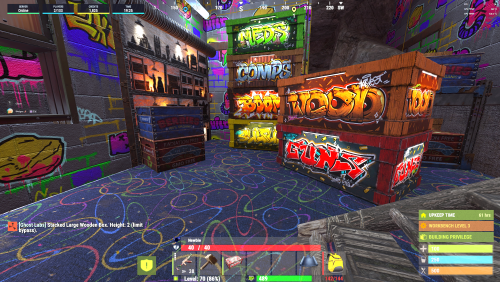
Version 2.1.1
229 downloads
A lightweight, native-feeling storage solution that allows players to safely stack Small Wooden Boxes and Large Wooden Boxes into clean vertical columns. GhostLabs Crate Stack preserves Rust’s normal deployment behavior while adding ownership validation, building privilege checks, configurable stack limits, obstruction detection, top-down pickup protection, skin support, and compatibility hooks for other plugins. No complicated commands are required—players simply equip a matching box, aim at an existing box, and press primary fire. Features Stack Small Wooden Boxes vertically Stack Large Wooden Boxes vertically Separate configurable limits for each box type Default limit of 5 Small Wooden Boxes Default limit of 3 Large Wooden Boxes Optional unlimited stacking permission Preserves deployed box skins Assigns correct ownership to newly stacked boxes Validates ownership across the entire column Requires building privilege at the new placement position Detects blocked or obstructed placement positions Prevents duplicate placement from the same input Prevents players from picking up lower boxes first Protects valid stacked boxes from Rust’s ground-support checks Respects external CanDeployItem hooks Calls Rust’s standard deployment lifecycle Configurable placement distance and cooldown Configurable alignment and rotation tolerances Optional administrator restriction bypass Built-in localization support Optional GhostLabs.Notifications integration Automatic chat-message fallback Live configuration reload command Debug mode for diagnosing placement obstructions No database or persistent player data No polling timers or background entity scans How It Works Place the first storage box normally. Equip another box of the same type. Aim at an existing box in the column. Press primary fire. The plugin locates the top of the column and safely places the new box above it. Small Wooden Boxes can only stack with other Small Wooden Boxes. Large Wooden Boxes can only stack with other Large Wooden Boxes. The configured maximum represents the total number of boxes allowed in one column. Supported Boxes Storage typeItem shortnameDefault maximum Small Wooden Boxbox.wooden5 Large Wooden Boxbox.wooden.large3 Each box type can be enabled, disabled, or configured independently. Permissions /cratestack — shows the command/help info /cratestack info — shows CrateStack status/info /cratestack debug — toggles debug mode and saves the setting /cratestack reload — reloads the config and reapplies its values ghostlabscratestack.use Allows players to stack boxes when permission requirements are enabled. ghostlabscratestack.admin Grants access to information, debug, and configuration reload commands. It can also bypass stacking restrictions when enabled in the configuration. ghostlabscratestack.unlimited Bypasses the configured stack-height limits while retaining normal ownership and building checks. Example: Oxide.grant group default ghostlabscratestack.use Oxide.grant user STEAMID ghostlabscratestack.unlimited Oxide.grant user STEAMID ghostlabscratestack.admin Server administrators automatically bypass stacking restrictions. Commands All commands require ghostlabs.cratestack.admin or server administrator status. CommandDescription /cratestackDisplays available commands. /cratestack infoDisplays the version and current important settings. /cratestack debugEnables or disables placement debugging. /cratestack reloadReloads and applies the configuration without reloading the plugin. Regular players do not need to use a command to stack boxes. Default Configuration { "ConfigVersion": "2.0.3", "RequirePermission": true, "RequireBuildingPrivilege": true, "RequireOwner": true, "AdminPermissionBypassesRestrictions": true, "AllowSmallWoodenBox": true, "AllowLargeWoodenBox": true, "MaxSmallWoodenBoxStack": 5, "MaxLargeWoodenBoxStack": 3, "RaycastDistance": 4.0, "PlaceCooldown": 0.35, "HorizontalAlignmentTolerance": 0.18, "VerticalAlignmentTolerance": 0.12, "RotationToleranceDegrees": 12.0, "CollisionBoundsInset": 0.02, "OnlyAllowTopCratePickup": true, "ProtectValidStacksFromGroundWatch": true, "RespectCanDeployItemHook": true, "ConsumeItemInCreativeMode": false, "DebugMode": false, "EnableChatMessages": true, "UseSharedNotifications": true, "Prefix": "<color=#9efcff>[Ghost Labs]</color>" } Configuration Breakdown SettingDescription RequirePermissionRequires the use permission before a player can stack boxes. RequireBuildingPrivilegeRequires building privilege at the new box position. RequireOwnerRequires the player to own every owned box in the column. AdminPermissionBypassesRestrictionsAllows the admin permission to bypass use, ownership, building, and height restrictions. AllowSmallWoodenBoxEnables Small Wooden Box stacking. AllowLargeWoodenBoxEnables Large Wooden Box stacking. MaxSmallWoodenBoxStackMaximum Small Wooden Boxes per column. MaxLargeWoodenBoxStackMaximum Large Wooden Boxes per column. RaycastDistanceMaximum distance at which an existing box can be targeted. PlaceCooldownDelay between placement attempts. HorizontalAlignmentToleranceAllowed horizontal difference when detecting a connected column. VerticalAlignmentToleranceAllowed vertical difference between connected boxes. RotationToleranceDegreesMaximum rotation difference between boxes in a column. CollisionBoundsInset reduces collision bounds to avoid false-positive contact. OnlyAllowTopCratePickupRequires boxes to be picked up from the top downward. ProtectValidStacksFromGroundWatchStops properly supported stacked boxes from being destroyed by ground checks. RespectCanDeployItemHookAllows compatible plugins to deny a stacking placement. ConsumeItemInCreativeModeControls whether stacking consumes boxes during creative free-build. DebugModeLogs and displays additional obstruction information. EnableChatMessagesEnables the built-in chat-message fallback. UseSharedNotificationsUses GhostLabs.Notifications when available. PrefixCustomizes the fallback chat prefix. Numeric configuration values are automatically clamped to safe ranges. Stack limits support values from 1 to 20 boxes. Safety and Exploit Protection GhostLabs Crate Stack validates every placement before consuming the held item. The plugin checks: Player permission Enabled box types Placement cooldown Entire-column ownership Configured stack limits Player distance from the intended position Building privilege External deployment hooks Physical obstructions Column alignment Box rotation Safe deployment metadata The plugin also intercepts handled placement input to prevent Rust from processing the same click a second time. Pickup Protection When top-only pickup is enabled, players cannot pick up a box that still has another connected box above it. This prevents floating boxes, unstable columns, accidental destruction, and players removing structural boxes from the middle of a stack. Plugin Compatibility GhostLabs Crate Stack respects the standard: CanDeployItem It also calls Rust’s normal deployment behavior and the standard: OnItemDeployed Other developers can listen for successful stacked placements through: OnGhostLabsCrateStacked( BasePlayer player, BaseEntity placedEntity, BaseEntity support, int newHeight ) Dependencies No required dependencies. Optional: GhostLabs.Notifications for shared styled notifications If GhostLabs.Notifications is not installed or cannot handle the notification, the plugin automatically falls back to localized chat messages. Installation Download GhostLabsCrateStack.cs. Place it in your server’s plugins directory. Allow the plugin to compile and load. Grant ghostlabscratestack.use to the desired players or groups. Edit the generated configuration if needed. Run /cratestack reload after configuration changes. Compatibility Rust Dedicated Server Carbon Oxide/uMod Small Wooden Box Large Wooden Box Important Limitations Only Small Wooden Boxes and Large Wooden Boxes are supported. Different box types cannot be mixed in the same column. Boxes are stacked vertically rather than freely positioned. Normal maximum limits are capped at 20 through configuration. The unlimited permission can bypass the configured height limit.Free