
.png.4ed5e711c7cc141e549e843fd468100d.png)
KpucTaJl
-
Posts
1,577 -
Joined
-
Last visited
-
Days Won
7
Content Type
Profiles
Warranty Claims
Downloads
Forums
Store
Services
Downloads Plus Support
DOWNLOADS EXTRA
Support Replies posted by KpucTaJl
-
-
Changed Status from Pending to Closed
-
The problem is solved in the Discord Mad Mappers ticket
-
perhaps you have set high values for the metro station area under these monuments and they remove the npcs for you
-
Quote
But that is working for all my other monuments, I have it disabled then true to remove all the other NPC
no, it doesn't work that way, you're wrong
-
in order to get the result you want, you need to enable the plugin on this monument, but disable all presets from the BetterNpc plugin on this monument, then it will remove the standard ones and will not spawn NPCs from the BetterNpc plugin
-
Not if you disable the "Enabled? [true/false]", then you tell the BetterNpc plugin that it does not need to do anything on this monument, that it does not need to make any changes to this monument, respectively, you have standard npcs
-
Hi, are you talking about the standard NPCs on this monument or about the NPCs from BetterNpc?
-
Hi, you most likely did not download all the files from the archive with the plugin, but only uploaded the plugin file to the server, the plugin says that there are no images on your server so that it can use them
-
Changed Status from Pending to Closed
-
Hi, show me all the messages from the server console when you load the plugin to the server, usually the plugin itself determines what the problem is and talks about it in the console
-
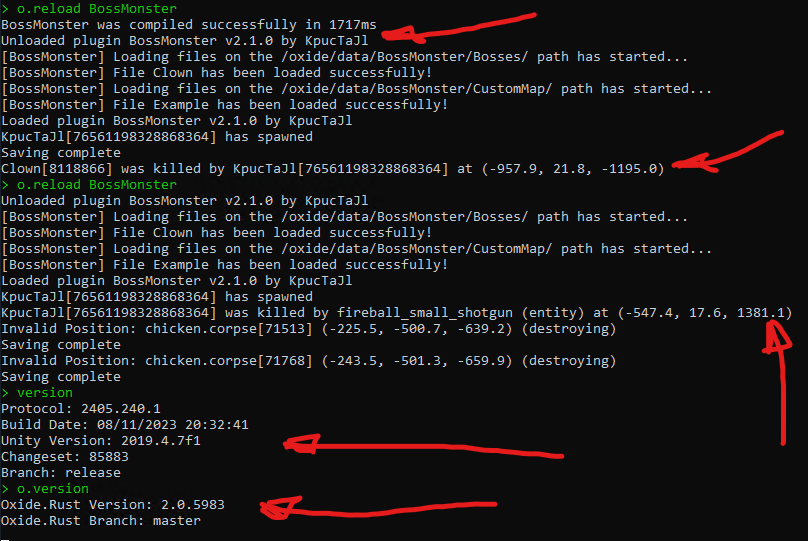
@hid333 Hi, I used your configuration on my test server, I just downloaded the archive from the site, and your configuration file to the server and I can't get this error that you sent about the OnEntityTakeDamage hook (I attach a screenshot of the console, which shows that the plugin was loaded, and also shows that I'm killing the boss, and next, I make it so that the boss kills me, also in the console you can see the version of the plugin, server and oxide). I need information on how I can get this error

Regarding the loot inside the boss, I attach a video of how I killed the boss and looked at the loot inside it, also as far as I understand the loot inside the NPC is configured by you and gives out how you configured 4 items out of 4 that you specified in the boss loot, in the configuration that you sent. If your loot differs from what you specified in the plugin configuration, then most likely you have some plugin installed that changes the loot in the assets/rust.ai/agents/npcplayer/humanpc/scientist/scientistnpc_heavy.prefab -
Hi, for all my events there is a plugin that creates a Pve mode of operation of the event, it is called PveMode, there are settings for it in the configuration of each event
-
Hi, I need the data of this map to check it for myself. I need to know the size and seed of this map
-
Hello everyone, I need to see the configuration file of any one boss with whom such a problem occurs
-
@Yukîî Hi, do you have a problem with the plugin and do you need my help? You did not provide an answer to the previous messages, I understand that the problem was solved independently or not?
-
Changed Status from Pending to Closed
-
Changed Status from Pending to Closed
-
Spam
in Better Npc
Changed Status from Pending to Closed
-
Changed Status from Pending to Closed
-
Changed Status from Pending to Closed
-
Changed Status from Pending to Closed
-
Changed Status from Pending to Closed
-
@MxWaRLorD Hi, do you have any other problems with the plugin or are you doing well? Do you need any help in this matter?
-
Changed Status from Pending to Closed
-
@yossy.k0634 Hi, do you have any other problems with the plugin or are you doing well?
-
@xxxcampxxx Hi, do you have any other problems with the plugin or are you already doing well and have figured out how to install the plugin yourself?
-
Changed Status from Pending to Closed
-
Changed Status from Pending to Closed
-
Changed Status from Pending to Closed
-
Changed Status from Pending to Closed
-
Changed Status from Pending to Closed
-
Changed Status from Pending to Closed
-
Changed Status from Pending to Closed
-
All requests to improve the plugin were added in the latest update
-
Changed Status from Pending to Closed
-
Hi, the link does not work for me to familiarize myself with the plugin. Could you tell me what this plugin does and why it is needed? You say that he adds a new Card Reader, could you show me where he adds it and on which door. Do I understand correctly that this Card Reader does not work during the event or does it not work at all after the event or only while the event is going on?
-
Changed Status from Pending to Closed
-
Hello everyone, if such boats appear, then there will be an NRE error in the console of your server, then you need to see this NRE error to understand what the problem is, if there is no such error, then these are boats that appear not by this plugin but by something else. This can be easily checked, you can find such a boat, restart the plugin and see if this boat disappears or not, if it disappears, then this is the boat from this plugin, if not, then not. You can also enable markers on the map for all boat presets, and also see if there will be a marker on the map for this boat
-
@MrLiquid Hello everyone, sorry for the long answer, I was away, I studied the Razor code and I think this happens when an Npc from NpcSpawn deals damage to an Npc from the current event. If this is the case and you want the damage to be done, then NpcSpawn has the CanTargetOtherNpc parameter, which then should have the value true, if you do not want the damage to be done then you need to make changes to the code in the event plugin
-
Changed Status from Pending to Closed
-
Hi, this is a question rather not to the plugin developer, but to the developers of RustAdmin or the administration of the Codefling site. I don't do something like that and I don't have any access to it
-
-
Hi. I have read the entire dialog and I have a list of questions and information that I need to understand your problem
1) Do I understand correctly that the problem does not always appear to you and is not natural?
2) You say that the console says that NpcSpawn is not loaded and this is a problem, could you send me a screenshot of this message
3) Send me all the messages (or screenshots) from your server console when you do the command o.reload NpcSpawn
4) Send me all the messages (or screenshots) from your server console when you do the o.reload BetterNpc command, I do a lot of messages while loading the plugin to the server to understand from them what this or that problem is
5) Do I understand correctly that you are using oxide or am I wrong and you are using carbon?
6) Send me all the messages (or screenshots) from your server console when you write the version and o.version command
-
-
Changed Status from Pending to Closed
-
Hi, most likely you have a file for a custom map that shows the position for this boss in this position and sometimes you get this position
-
what was the previous version of the plugin? have you seen the update instructions if you had a version older than 1.1.9. Did you update the plugin correctly according to this instruction if you had an older version?
-
Changed Status from Pending to Closed
-
Hi, the plugin has been updated
-
Hi, if you are talking about which new types of NPCs are coordinated, then you need to make your own artificial intelligence for each of them. If you are talking about setting up the current ones, then this is in the plugin configuration. You gave an example using grenade launchers, you can change that, but adding new types of NPCs is not just a configuration revision, each type of NPC has its own AI that will work and that needs to be done
-
Thank you @Razor, later I will study this and update the plugin
-
Could you show me their behavior on video so that I can see it and think about what it might be related to? And also send me a configuration file, any one with which there is such a problem
-
Hi, I need all the messages from your server console when you load NpcSpawn and BetterNpc. There is also one configuration file with which there is such a problem
-
Changed Status from Pending to Closed
-
I don't need the videos as proof. You don't need to prove to me that you have some kind of problem, I'm not asking for it. I need the video to see for myself what's going on and how you got it. It is important for me to see your actions in this video to understand how it happened
-
I usually prefer to solve problems rather than discuss these. What are such approaches made of
-
If I had such a problem or someone else from the clients, then I would not ask you for a video of how you get it. And if I can't get your problem, then I can't fix it, the logic is simple. Therefore, I need to clearly understand all your actions in order to repeat it at home, but it will not be possible to do it, because you may miss something and then the time I spent on the test will be lost again. The fastest and most effective method of solving such problems is video. You can record a video and spend an hour on it, or use a chat and try to understand the problem for several days. You say that you don't have time for this, but we have already opened this ticket for several days and you have already spent a lot of time, although you could have done everything in one day
-
Do you want to understand the problem or are you not interested in it?
-
-
Hello everyone, I have studied this ticket. When you throw a car out of the event zone, it ceases to be the object of the event, and accordingly the marker on it ceases to exist, and a new car appears in the event zone instead. If the car that was needed for the plane to arrive was thrown out of the event zone, then another car will appear instead of it and the necessary one will be randomly selected from the list of remaining cars. In fact, I do not understand what your problem is, and what you want to say, what happened to you, about what you are asking for help. You say that you threw away the car and the marker disappeared, but this is normal behavior, judging by what I described above. Definitely need a video that will depict what you want to talk about
-
any news?
-
-
-
Hi, which object does damage to which object when you get this conflict?
-
this is not their normal behavior, and you need to determine why they do it, they should not do it with the standard setup, you can change all the parameters that you said in the plugin configuration, but what you are talking about is no longer normal and you need to look for the reason for this behavior, I think, and not change the configuration parameters of presets npcs
-
send me the setup file for this metro block where you are doing tests, and also send me all the messages from your server console when you load NpcSpawn and BetterNpc
-
by the way, in the screenshots I noticed that not all boats are shown with markers, most likely you have not enabled the display of markers for all presets, send your configuration file
-
then why did you open a ticket if you don't want to solve your problem?)
those commands that you sent, they are responsible for the spawn of resources on your server
you say that after you unload the plugin, the patrols remain with you, but in the screenshots that you sent it is not or not visible, record a video like I did where it is clearly visible that the boats were, I showed it to you on the screen and on the map, then when I unload the plugin then they are all gone, make me the same comparison, in which the picture will be clearly visible before the plugin is unloaded and after, so that I can at least think about something so that I have a chance to help you
but in any case, if you don't want to solve problems on your server, then I can't help you, no matter how much I want to( -
-
Hi, I checked it on three servers, there is no such problem, most likely some of the plugins on your server gives this result, especially if there is no error in the console. If there was an error in the console, then I could think about your configuration, and so I can think that this is done by some of the plugins on your server. I advise you to test this theory. I will wait for your answer, after disabling which plugin this behavior stopped
-
Changed Status from Pending to Closed
-
-
Hi, this is certainly not normal, they should be deleted, if you get it means you have some errors in the server console, send them to me
-
Hello, all three options are available to you, you can help one or help the other, or kill both, the password to the bathroom is issued as a reward to one of the gangs

Removing NPC Military Base
in Better Npc
Posted
with this setup, the plugin will not make any changes to this monument, once again, you are wrong. Most likely you have a metro station under this monument or there is some other monument and it has large dimensions for its zone, so it is not this monument that removes them, but the metro station under it or another monument