Storption
-
Posts
1 -
Joined
-
Last visited
Content Type
Profiles
Warranty Claims
Downloads
Forums
Store
Services
Downloads Plus Support
DOWNLOADS EXTRA
Reels
Everything posted by Storption
-
Version 3.2.0
15 downloads
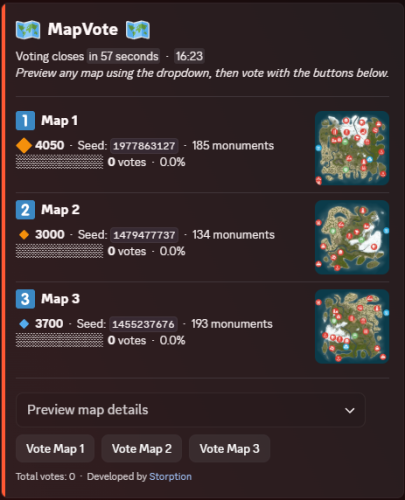
Map Vote Bot MapVote is a self-hosted Discord bot that lets your Rust community vote on the next wipe map. Built for server owners who want a clean, reliable voting system. What's New in v3.2.0 Custom Map Generation — Generate brand-new maps on demand via RustMaps' custom map generation API, using a saved config you've built on RustMaps' website. Available both for wipe schedule auto-pick and for manually creating a vote. Requires a RustMaps Premium (or higher) subscription. Customizable size icons — Set your own Small/Medium/Large emoji and the size cutoffs that define them, applied consistently across every vote message, result, search, and preview. Clearer monument breakdowns — Monument lists are now grouped into categories (Military & Endgame, Loot tiers, Ocean, Safe Zones, Resources, and more) instead of one long list. Features - Persistent admin dashboard with tabbed navigation (Overview, Vote, Automation, History, Settings) - Live vote tracking with animated progress bars - 2–5 maps per vote - Standard maps (any size/seed), custom RustMaps.com maps, and brand-new generated maps - Custom map generation via RustMaps' saved configs — for wipe schedule auto-pick and manual vote creation alike (requires a RustMaps Premium or higher subscription) - Detailed map info — biomes, islands, rivers, monuments (grouped by category), and more - Automatic winner determination with random or runoff tie-breaking - Customizable size icons and thresholds for how maps are labeled Small/Medium/Large - Wipe schedule automation — weekly, biweekly, and monthly (by Nth weekday or last weekday) - Auto-pick maps from RustMaps based on size, biome, terrain, and monument filters - Per-vote voter role gating — restrict who can vote per session - Live vote editing without ending the vote - Paginated vote history with winner links, vote counts, and win-rate stats - Vote and dashboard message recovery on deletion - 24-hour advance reminder when a scheduled wipe has no maps set - All votes and config stored in SQLite — nothing is lost on restart - Full multi-guild support Commands /setup Create or move the admin dashboard to a channel /search Browse RustMaps with filters — size range, biomes, terrain, monuments (available to all members) Restricting Access /setup requires Administrator by default. You can grant it to specific roles without giving them full admin — go to Server Settings > Integrations > MapVote and configure per-command role access. /search is available to all members by default and can be restricted the same way. Requirements Node.js 24+ Discord bot token RustMaps.com API key Setup Download and extract the files Run npm install Fill in your TKN & RUSTMAPS_API_KEY in the .env file (Optional — only if generating custom maps under an organization's RustMaps account rather than your personal one in the .env) RUSTMAPS_ORG_ID=OptionalOrgIdHere Run npm start Use /setup #your-admin-channel to create the dashboard Need help? Join the support server: Click Here Updating Stop the bot Delete the src/ folder Copy in the new src/ folder and overwrite package.json, CHANGELOG, and README.md files Delete the node_modules/ folder and package-lock.json file Run npm install Start the bot (npm start) Your .env and db/ files are not touched — all settings and data are preserved.$40.00