Ryuk_
-
Posts
471 -
Joined
-
Last visited
Content Type
Profiles
Warranty Claims
Downloads
Forums
Store
Support
DOWNLOADS EXTRA
Services
Everything posted by Ryuk_
-
Plugin updated with that fix.
-
Hello i've added some checks to make this not happens, anyways the function ony make to now spawn the deployables that are not grounded, it will not spawn. That's the unique way to fix the problem i found, since i couldn't make it to be grounded if it wasn't touching the ground.
-
Please open the creative.json config file Search for "Building Load Timer between structures (def 0.5f)": 0.5, Replace the 0.5 value for something else Lower value = faster base load. Higher value = slower base load. Do not use any value lower than 0.03 or the loading base will lag the server.
-
Changed Status from Pending to Work in Progress Changed Fixed In to 1.1.1996
-
Changed Status from Pending to Work in Progress Changed Fixed In to Next Version
-

I dont know how to upload to plugin and for it to work
Ryuk_ replied to Jackattackks's Support Request in Support
Changed Status from Work in Progress to Closed -
Changed Status from Work in Progress to Closed
-
Changed Status from Work in Progress to Closed
-
Changed Status from Work in Progress to Closed
-
Changed Status from Pending to Work in Progress Changed Fixed In to Next Version
-
Changed Status from Pending to Work in Progress Changed Fixed In to Next Version
-
Changed Status from Pending to Work in Progress Changed Fixed In to 1.0.16
-
Hi, sorry for that problem, yes there are missing files but those are only for test purpose (Map and arenas cfg to test it) You should first load the plugin. Then edit the config file in /configs/bedwars.json Connect your mysql db server "DB Server": "localhost", "DB Username": "root", "DB Password": "root", "DB Database": "dbname" After this, reload the plugin and the db will be generated automatically. BedWars_DataMissing.zip
-
Changed Status from Work in Progress to Closed Changed Fixed In from 1.1.1992 to 1.1.1995
-
Changed Status from Work in Progress to Closed Changed Fixed In from 1.1.1993 to 1.1.1995
-
I dont know how to upload to plugin and for it to work
Ryuk_ replied to Jackattackks's Support Request in Support
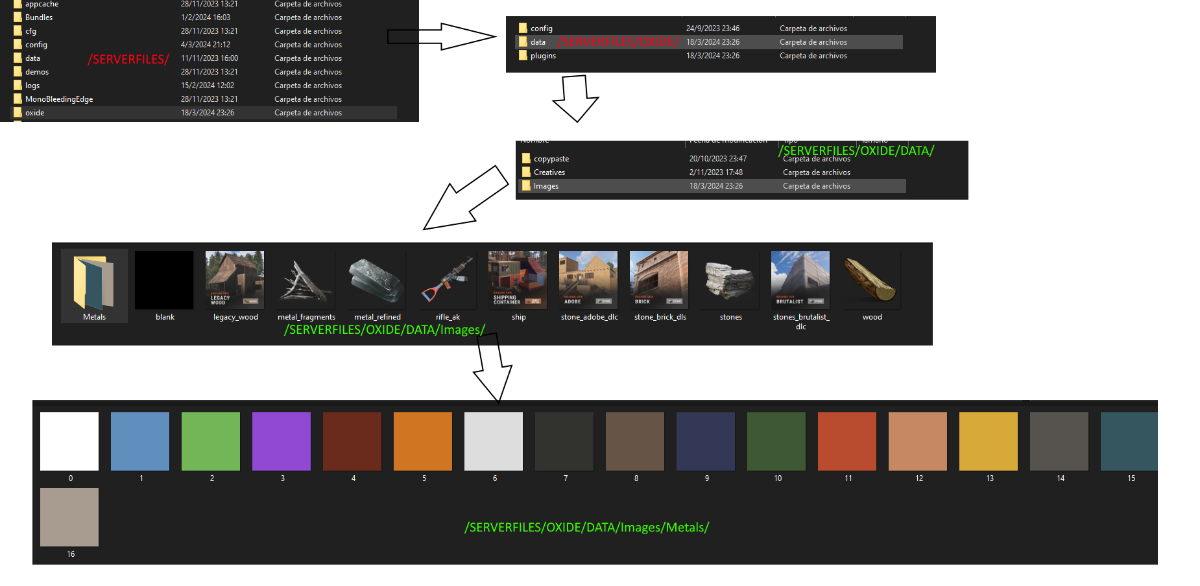
You should move the files in the correct folders. Or create each folder and place the images in the correct folders too The plugin currently requires that the images are in their corresponding folders, you need to place them in their place for everything to work correctly. MAKE SURE YOU PUT ALL THE 1 TO 16 IMAGES IN THE Metals folder, that's the only problem right now.
-
Changed Status from Pending to Work in Progress Changed Fixed In to 1.1.1993
-
With cabinet what do you mean? Also thanks for the report, i will take a look at those bugs and i will update the plugin soon with some changes
-
I dont know how to upload to plugin and for it to work
Ryuk_ replied to Jackattackks's Support Request in Support
A tutorial is not necessary for this type of things, since it's just a copy-paste of the folders Just move the folders of the .zip into the /oxide/ folder the problem here is that your host doesn't let you create new folders, that's a hosting problem and you should talk with them to create new folders The actual problem you're having is that you don't have the images folder with all the data inside. if you keep having the same problem that can't create folders, please contact your hosting support and let them know that problem so they can fix it for you -
I dont know how to upload to plugin and for it to work
Ryuk_ replied to Jackattackks's Support Request in Support
Yes, you should make both folders one called Images inside /oxide/data/ the other called "Metals" inside /oxide/data/Images/ -
I dont know how to upload to plugin and for it to work
Ryuk_ replied to Jackattackks's Support Request in Support
if you're using a host, try to create the next thing in that host 1 folder called "Images" inside /oxide/data/ 1 folder called "Metals" inside /oxide/data/Images Place all the next images inside the "Images" folder - blank - legacy_wood - metal_fragments - metal_refined - rifle_ak - ship - stone_adobe_dlc - stone_brick_cld - stones - stones_brutalist_dlc - wood Place all the next images inside the "Metals" folder - image 0 to 16 -
I dont know how to upload to plugin and for it to work
Ryuk_ replied to Jackattackks's Support Request in Support
add that folder inside the/oxide/data/ folder, and then reload the plugin -
I dont know how to upload to plugin and for it to work
Ryuk_ replied to Jackattackks's Support Request in Support
You should put that folder inside the /data/ folder just move it from the .zip file -
I dont know how to upload to plugin and for it to work
Ryuk_ replied to Jackattackks's Support Request in Support
Sorry for the problem, did you put the "Images" folder inside /carbon/data/ or /oxide/data/? -
I dont know how to upload to plugin and for it to work
Ryuk_ replied to Jackattackks's Support Request in Support
Do you get any console error after placing the plugin in the plugins folder?