
-
Posts
3 -
Joined
-
Last visited
Content Type
Profiles
Warranty Claims
Downloads
Forums
Store
Services
Downloads Plus Support
DOWNLOADS EXTRA
Everything posted by Nomad Rush
-
Version 1.0.0
1 download
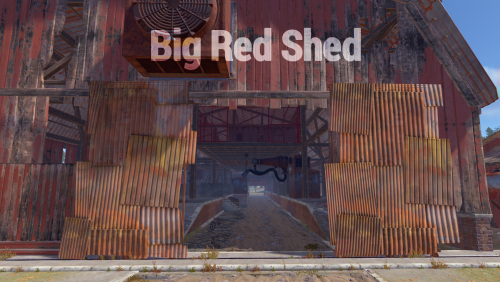
BIG RED SHED by Nomad Rush A series of huts gathered together around a large shed. Vehicles may drive through on the interior lane. Above is an elevated floor with nooks and corners to explore. This rustically red monument has low-tier loot throughout. Plenty of space to add your own NPCs, puzzles and hi-tier gear. OBJECTS: 321 INSTRUCTIONS • Download and place in RustEdit folder at RustEdit/CustomPrefabs • Load RustEdit • Search for prefab in custom prefab browser • Select prefab in list and drag onto map • Once positioned, apply Biome, Height, Splat and Topology modifiers • Break prefab into parts, by clicking "break prefab" tab (highlighted in red) • Use Terrain Tool, select modification type 'smooth' and use brush to flatten rough edges around monument's ground surface, blending with your map surface. ADD A NAME • Search Prefab List for 'monument marker', select and place marker over prefab, in text box where it says 'Decor', Delete that word and type 'Big Red Shed' or whatever you wish to name it. ANY PROBLEMS? Please advise. DM or hop into dev discord: z7znZmy8zb$5.00 -
Version 1.0.0
3 downloads
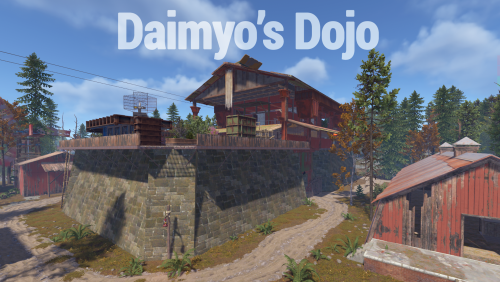
DAIMYO's DOJO by Nomad Rush An ancient fortress rises above the forest. Inside are many floors and corners to explore in the dojo and outer structures. Enter main gates of the core structure or climb the tall wall ladders. This ancient monument has low-tier loot throughout, with plenty of space to add your own NPCs, puzzles and hi-end loot. OBJECTS: 636 VIDEO: https://youtu.be/NwG3brPNTMY INSTRUCTIONS FOR MAPPERS • Download and place in RustEdit folder at RustEdit/CustomPrefabs • Load RustEdit • Search for prefab in custom prefab browser • Select prefab in list and drag onto map • Once positioned, apply Biome, Height, Splat and Topology modifiers • Break prefab into parts, by clicking "break prefab" tab (highlighted in red) • Use Terrain Tool, select modification type 'smooth' and use brush to flatten rough edges around monument's ground surface, blending with your map surface. ADD A NAME • Search Prefab List for 'monument marker', select and place marker over prefab, in text box where it says 'Decor', Delete that word and type 'Daimyo's Dojo' or whatever you wish to name it. ANY PROBLEMS? Please advise. DM or hop into dev discord: z7znZmy8zb$10.00 -

Version 1.0.0
2 downloads
SKYPORT features an iron skyship parked high above its ground-base. Features many authentic places for players to explore; main terminal building with outer support areas. 3 points of access up to the skyship above. Crew cabins aboard to check along the main gondola. Climb up over the high arched back or go deep inside the core structure from the aft landing pad. This Skyport prefab has low-tier loot throughout leaving plenty of space to add your own NPCs, puzzles and hi-tier gear. -- rusty regards! OBJECTS: 1382 VIDEO: https://www.youtube.com/watch?v=oVQsZ0AfsgU INSTRUCTIONS for mappers: Download and place in RustEdit folder at RustEdit/CustomPrefabs. • Load RustEdit • Search for new prefab in custom prefab browser • Once positioned on your map, apply Biome, Height, Splat and Topology modifiers • Break prefab into parts, by clicking "break prefab" tab (highlighted in red) • Use Terrain Tool to select modification type 'smooth' and use brush to flatten rough round edges around monument's ground surface, blending it with your map's ground surface. NAMING PREFAB: Search Rustedit's Prefab list and look for 'monument marker' • Select and place marker at centre of prefab • Look for text box where it says 'Decor' • Delete that word and type the 'Skyport' or whatever you wish to name prefab. FOR HELP, DM me or hop into dev discord: z7znZmy8zb • Any problems? Please advise.$15.00