

About WorkBench Taxes
TechTreeTax – Wipe-Scaled Tech Tree & Research Taxes
Early wipe scrap should hurt. Late wipe it should feel normal.
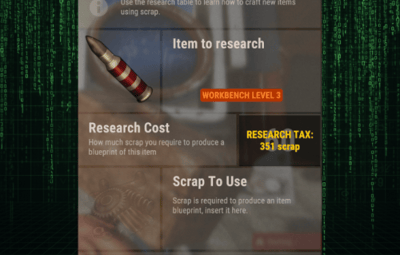
TechTreeTax adds a dynamic scrap tax to the tech tree and research table, scaling automatically with the days since wipe. Prices start brutal and smoothly relax over time, keeping early progression slow and meaningful without punishing late joiners.
You get clear UI, chat messages, and full control from config – including manual wipe time and external sync with RustWipeInfoPlus.
Key Features
-
 Dynamic tech tree tax
- Scrap cost is multiplied based on days since wipe.
- Fully configurable start %, end %, and duration in days.
- Uses vanilla tech tree prices as the base (optional).
 Dynamic research table tax
- Same system for research table scrap cost.
- Separate curve for research vs tech tree if you want different scaling.
 Wipe-aware scaling
- Reads wipe age from RustWipeInfoPlus (optional).
- If RustWipeInfoPlus is not installed or disabled, you can:
- Use a manual wipe start timestamp in the config, or
- Let TechTreeTax auto-detect new map/seed/size and start from there.
 Player-facing UI and messages
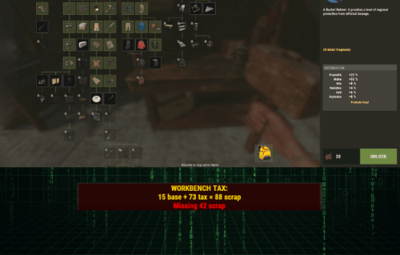
- Top-screen HUD bar showing:
- Base price
- Tax amount
- Final price (base + tax = total)
- Connect message: “Taxes are currently X% (Day Y of the wipe).”
- Proximity message when entering a workbench area.
- All text is configurable through the plugin’s language file.
 Smart unlock handling
- When unlocking via tech tree:
- Checks total scrap needed (base + tax).
- If not enough scrap → denies unlock and shows red cost HUD.
- If enough scrap → takes the scrap and prints a summary:
- You paid {total} scrap (base {base}, tax {tax}) for {item}.
- Same flow for research table.
 Permissions and bypass
- Allow staff or VIP to bypass the tax.
- Enable/disable bypass permission in the config.
- Admin permission for config/testing commands.
 Clean config & data
- Separate sections for:
- General settings
- UI layout/colors
- Wipe scaling (tech tree + research)
- Notifications
- External wipe source (RustWipeInfoPlus / manual)
- Data stored in a dedicated data file:
- Last map, seed, size
- WipeStartUnix (used to compute days since wipe)
- Vanilla price cache stored in its own data file; auto-rebuilt when needed.
QuoteCommands & Permissions
Permissions
- techtreetax.admin
- Access to admin/testing commands (if you add them, like sync/refresh).
- techtreetax.bypass
- Player ignores tax (pays normal vanilla prices).
Suggested Admin Command (optional, if you keep it in)
- /tax.syncwipe
- Forces TechTreeTax to sync its internal wipe start time from RustWipeInfoPlus.
- Useful if you adjust the wipe time manually on RustWipeInfoPlus and want TechTreeTax to match instantly.
Why Use TechTreeTax?
- Makes early wipe slow, harsh and meaningful without editing every item.
- Automatically relaxes the grind as the wipe ages.
- Gives clear, visual feedback so players understand why something is expensive.
- Plays nicely with wipe tracking plugins via RustWipeInfoPlus or manual config.
Any questions or suggestions! Feel free to reach out