

About Password Protector
Password Protector is a premium, lightweight, and robust GUI-based password protection plugin for Rust servers (compatible with both Oxide and Carbon).
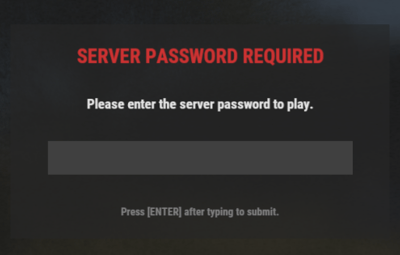
Upon waking up, players are presented with a secure, blurred UI overlay requiring a server password to authenticate. Until they enter the correct password, they are blocked from executing console/chat commands, interacting with objects, chatting, looting, or taking/dealing damage.
This plugin was developed with the assistance of Gemini (AI).
Features
- Secure GUI Overlay: Prompts players with a clean, centered interface. The input field uses native password masking (`•••••`) to prevent stream-sniping or screen-sharing leaks.
- Exploit & Interaction Prevention: Completely blocks chats, looting, interactions, commands, and damage while unauthenticated.
- 3-Strike Rule: Automatically kicks players who fail to enter the password within the configured limit of attempts.
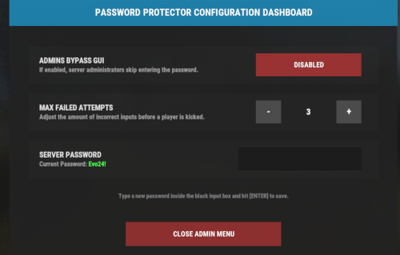
- Dynamic Admin Dashboard: In-game GUI dashboard (`/passgui`) allows administrators to change configurations in real-time.
- Auto-Saving Configs: Changes made via the in-game dashboard are written directly to your config file instantly.
Commands
Chat Commands
- /passgui — Opens the admin configuration dashboard (Requires Admin or permission).
Console Commands
- passwordprotection.submit <password> — Internal command used to submit the password from the login GUI.
- passwordprotection.admin_togglebypass — Toggles whether admins bypass the security screen.
- passwordprotection.admin_adjustattempts <number> — Adjusts the maximum failed attempts threshold.
- passwordprotection.admin_setpassword <password> — Sets the server-wide password.
- passwordprotection.admin_close — Safely closes the admin panel.
Permissions
This plugin features granular control over who needs to enter the password:
- passwordprotection.admin — Required to open the `/passgui` dashboard and configure the plugin in-game.
- passwordprotection.bypass — Players or groups with this permission will bypass the password check completely (e.g., VIPs or loyal members).
How to Grant Permissions
oxide.grant user <NameOrSteamID> passwordprotection.admin
oxide.grant group default passwordprotection.bypass
Configuration
The configuration file is automatically created at `oxide/config/PasswordProtector.json` upon the first load. You can modify it manually or use the `/passgui` dashboard in-game.
Default Configuration
{
"ServerPassword": "SecretPassword123",
"MaxAttempts": 3,
"AdminsBypass": false
}
Installation
1. Download the PasswordProtector.cs file.
2. Place the file in your server's `oxide/plugins` (or `carbon/plugins`) directory.
3. The plugin will compile automatically.
4. Grant yourself the `passwordprotection.admin` permission and type /passgui in-game to configure your security.
Credits
Created with the help of Gemini (AI), and Evo! Feel free to modify and customize the code to fit your community's specific needs!
