
-
Posts
1 -
Joined
-
Last visited
Content Type
Profiles
Warranty Claims
Downloads
Forums
Store
Services
Downloads Plus Support
DOWNLOADS EXTRA
Everything posted by EvoGaming
-
Version 1.0.0
23 downloads
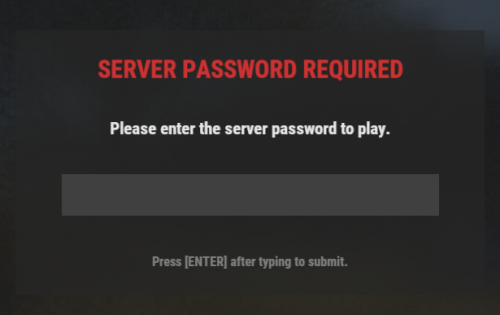
Password Protector is a premium, lightweight, and robust GUI-based password protection plugin for Rust servers (compatible with both Oxide and Carbon). Upon waking up, players are presented with a secure, blurred UI overlay requiring a server password to authenticate. Until they enter the correct password, they are blocked from executing console/chat commands, interacting with objects, chatting, looting, or taking/dealing damage. This plugin was developed with the assistance of Gemini (AI). Features - Secure GUI Overlay: Prompts players with a clean, centered interface. The input field uses native password masking (`•••••`) to prevent stream-sniping or screen-sharing leaks. - Exploit & Interaction Prevention: Completely blocks chats, looting, interactions, commands, and damage while unauthenticated. - 3-Strike Rule: Automatically kicks players who fail to enter the password within the configured limit of attempts. - Dynamic Admin Dashboard: In-game GUI dashboard (`/passgui`) allows administrators to change configurations in real-time. - Auto-Saving Configs: Changes made via the in-game dashboard are written directly to your config file instantly. Commands Chat Commands - /passgui — Opens the admin configuration dashboard (Requires Admin or permission). Console Commands - passwordprotection.submit <password> — Internal command used to submit the password from the login GUI. - passwordprotection.admin_togglebypass — Toggles whether admins bypass the security screen. - passwordprotection.admin_adjustattempts <number> — Adjusts the maximum failed attempts threshold. - passwordprotection.admin_setpassword <password> — Sets the server-wide password. - passwordprotection.admin_close — Safely closes the admin panel. Permissions This plugin features granular control over who needs to enter the password: - passwordprotection.admin — Required to open the `/passgui` dashboard and configure the plugin in-game. - passwordprotection.bypass — Players or groups with this permission will bypass the password check completely (e.g., VIPs or loyal members). How to Grant Permissions oxide.grant user <NameOrSteamID> passwordprotection.admin oxide.grant group default passwordprotection.bypass Configuration The configuration file is automatically created at `oxide/config/PasswordProtector.json` upon the first load. You can modify it manually or use the `/passgui` dashboard in-game. Default Configuration { "ServerPassword": "SecretPassword123", "MaxAttempts": 3, "AdminsBypass": false } Installation 1. Download the PasswordProtector.cs file. 2. Place the file in your server's `oxide/plugins` (or `carbon/plugins`) directory. 3. The plugin will compile automatically. 4. Grant yourself the `passwordprotection.admin` permission and type /passgui in-game to configure your security. Credits Created with the help of Gemini (AI), and Evo! Feel free to modify and customize the code to fit your community's specific needs!Free