
KONG DONK 大鸡巴
-
Posts
1 -
Joined
-
Last visited
Content Type
Profiles
Warranty Claims
Downloads
Forums
Store
Services
Downloads Plus Support
DOWNLOADS EXTRA
Reels
Everything posted by KONG DONK 大鸡巴
-
Version 1.4.3
78 downloads
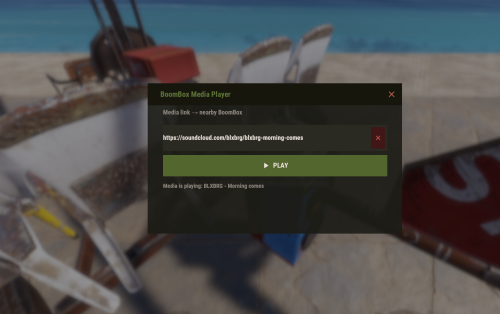
Boombox is a Carbon/Oxide plugin paired with a lightweight Node.js sidecar service that allows players to stream audio through in-game BoomBoxes. Players simply open the Boombox UI, paste a supported media URL, and the system automatically downloads, converts, and streams the audio to the selected BoomBox. The plugin uses yt-dlp for media extraction and supports a wide range of websites supported by yt-dlp: Features Play audio from hundreds of supported websites Simple in-game user interface Automatic audio download(stream) and MP3 conversion (in the right format) Supports both Carbon and Oxide servers Ownership and Tool Cupboard authorization checks API key authentication between plugin and streaming service Optional YouTube login support through browser cookies Works with standard Rust BoomBoxes Requirements Server Requirements Linux server (Ubuntu/Debian recommended) Node.js 18 or newer Python 3 ffmpeg Rust server running Carbon or Oxide Player Requirements Rust BoomBox DLC item Permission: boombox.use Installation 1. Install the Boombox Service Navigate to the rust-boombox directory and run: sudo apt update sudo apt install -y ffmpeg nodejs npm python3 python3-venv curl nginx then configurate nginx/rust-boombox.conf.example and then run the scripts: cd rust-boombox chmod +x install.sh scripts/*.sh download_audio.py ./install.sh The installer will download and configure all required dependencies. (yt-dlp, Python-venv, npm und .env) 2. Configure the Service Edit the generated .env file. At minimum, configure: BOOMBOX_API_KEY=your_secret_key PUBLIC_BASE=http://YOUR_SERVER_IP/bb *The PUBLIC_BASE value must be reachable by players from their own computers, not only from the game server itself. Examples: PUBLIC_BASE=http://203.0.113.50/bb or PUBLIC_BASE=http://203.0.113.50:3891/bb *HTTPS is optional and not required. 3. Install the Plugin Copy the plugin and configuration files: cp carbon/plugins/Boombox.cs to /path/to/carbon/plugins/ cp carbon/configs/Boombox.json.example to /path/to/carbon/configs/Boombox.json Make sure the API key inside Boombox.json matches the value configured in .env. Example: { "ApiKey": "your_secret_key" } 4. Start the Service Run manually: npm start Or install as a systemd service: sudo ./install.sh --systemd Check status: sudo systemctl status rust-boombox 5. Load the Plugin Load the plugin and grant permission: c.reload Boombox and then grant user the permission boombox.use Player Usage Place a BoomBox or stand near an existing BoomBox. Ensure you own the BoomBox or have Tool Cupboard authorization. Run: /boombox Paste a supported media URL. Press Play. Wait for the media to download and begin streaming. *Depending on the source and media length, initial loading may take up to one minute. YouTube Login (Optional) Some YouTube videos require authentication. To create and maintain YouTube cookies: cd rust-boombox npm run login Verify cookie status: npm run yt-status Restart the service afterward: sudo systemctl restart rust-boombox Troubleshooting Invalid Media Link Restart the Boombox service: sudo systemctl restart rust-boombox Stream Service Unreachable Verify the service is running: sudo systemctl status rust-boombox Check that the configured port is accessible through the firewall. No Audio In-Game Verify that the configured PUBLIC_BASE URL is reachable from a player's computer. YouTube Playback Fails Refresh YouTube cookies: npm run login API Unauthorized Ensure the API key in Boombox.json exactly matches BOOMBOX_API_KEY in the service configuration. Health Check Verify the service is running: curl http://127.0.0.1:3891/health File Structure rust-boombox/ server.mjs download_audio.py .env cache/ logs/ cookies/ browser-profile/ Plugin logs are stored in: carbon/data/Boombox/logs/ (or the equivalent Oxide data directory). Additionally: Keep your cookies.txt safe. (or the file browser folder) Do not share it with anyone, as it contains the session tokens for your YouTube account. This plugin is a technical streaming utility only. The developer does not host, provide, or distribute any media files. As a server administrator, you are solely responsible for ensuring that the content streamed through this service on your server complies with local copyright laws and platform terms of service. It is highly recommended to instruct your players to only stream royalty-free music, Creative Commons content, or media they own the rights to. Suggestions for improvements and feature requests are always welcome! Let me know if you run into any issues or have ideas to make this plugin even better. For security reasons, it is highly recommended not to run this service as root. Credits Plugin development by Kong Donk. Powered by yt-dlp for media extraction and Rust's built-in BoomBox streaming functionality.Free