Jump to content

Storption

Creator
  • Posts

    1
  • Joined

  • Last visited

Everything posted by Storption

  1. Version 1.0.0

    1 download

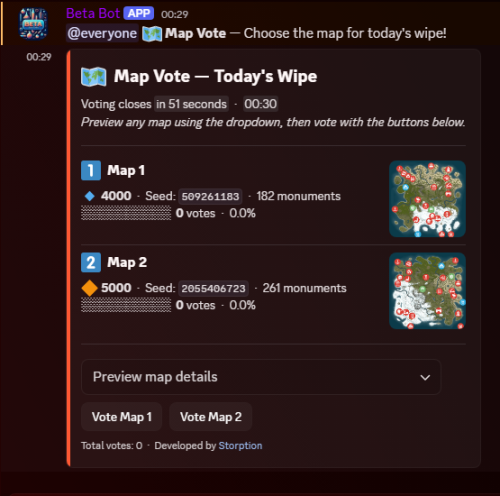
    MapVote Discord Bot - Map Voting System for Rust Servers MapVote is a Discord bot designed specifically for Rust server owners who want to engage their community in choosing the next wipe map. This sophisticated system transforms the map selection process from a server admin decision into an interactive community event that builds excitement and player engagement. Gone are the days of manually asking players what map they want or making arbitrary decisions. MapVote provides a complete, automated solution that handles everything from map configuration to vote tallying, with beautiful visual presentations and detailed map information pulled directly from RustMaps.com. Key Features Real-time Vote Tracking: Live vote counts with animated progress bars Automatic Winner Selection: Handles ties with random selection when needed Standard Maps: Support for any size/seed combination Custom Maps: Full integration with custom RustMaps.com maps Staging Maps: Support for both regular and staging branch maps Map Previews: Detailed information including biomes, monuments, and terrain features Rich Map Information: Displays map size, seed, biomes, and terrain features Flexible Map Count: Support for 2-5 maps per vote How It Works 1. Initial Setup (One-Time) Server administrators configure the bot with their Discord bot token and RustMaps API key. The setup process is straightforward with clear documentation and support. 2. Creating a Vote Command Execution: Admin runs /map_vote command Map Count Selection: Choose between 2-5 maps for the vote Map Type Selection: Decide between standard maps (size/seed) or custom maps Individual Map Configuration: Configure each map with detailed information Preview & Confirmation: Review all maps before launching the vote Duration Setting: Set custom vote duration (default: 1 hour) 3. Community Voting Players see a embedded message with all map options Each map shows size, seed/type, and current vote count with progress bars Players can click buttons to vote for their preferred map Users can view detailed map information including biomes and terrain features Real-time updates show vote progress as it happens 4. Automatic Results Vote automatically ends at the specified time System calculates winner (handles ties with random selection) Setup Requirements Prerequisites: Node.js npm package manager (comes with node) Discord Application with Bot Token RustMaps.com API Key (free registration) The bot needs the following Discord permissions: View Channels Send Messages Embed Links Mention Everyone Read Message History Installation Guide Step 1: Download and Extract Download the MapVote bot files, extract to your desired directory, open terminal/command prompt in the bot folder Step 2: Install Dependencies Type npm install into the terminal/command prompt Step 3: Configuration Discord Bot Setup Visit Discord Developer Portal, create new application and bot and copy the bot token. Invite bot to server with required permissions Environment Configuration Open the .env file add your bot token: TKN=YourBotTokenHere, add RustMaps API key: RUSTMAPS_API_KEY=YourApiKeyHere User ID Configuration Open src/index.js, replace "YOUR_DISCORD_USER_ID_HERE" with your Discord User ID RustMaps API Key Visit RustMaps.com create free account generate API key from account settings add to .env file Step 4: Launch Type node src/index.js into terminal/command prompt, the bot will automatically create necessary database files and be ready for use! Ready to revolutionize your server's map voting? Get MapVote today and give your community the voice they deserve in shaping their Rust experience.
    $50.00
2.1m

Downloads

Total number of downloads.

9.8k

Customers

Total customers served.

143.4k

Files Sold

Total number of files sold.

3m

Payments Processed

Total payments processed.

×
×
  • Create New...

Important Information

We have placed cookies on your device to help make this website better. You can adjust your cookie settings, otherwise we'll assume you're okay to continue.