

-
Posts
94 -
Joined
-
Last visited
-
Days Won
2
Content Type
Profiles
Warranty Claims
Downloads
Forums
Store
Services
Downloads Plus Support
DOWNLOADS EXTRA
Support Replies posted by RIPJAWBONES
-
-
Use a plugin like better loot or a loot modifier plugin, the beach shipping containers are not intended to have a lot of loot as they are easy to farm. I'll most likely add more options in future updates.
-
I'm working on it, will try to have it ready by Wednesday night, sorry for delay.
-
15 hours ago, xlr8tednergy said:
I absolutely love the idea of this, but would there be a way, in the upcoming versions, to make it so.. the timer on "when cargo sinks" is only initiated when cargo spawns? At the moment.. it appears to be on 1800 seconds.. no matter what... Example... cargo got "torpedoed" about 2 crates in earlier... and sunk a few minutes later.... and then before it could spawn again... the plugin attempted to SINK it again.. and it was unable because no cargo ship was even on the map. I love this idea greatly

also... some way to adjust the timers for the rotation/sink speed... etc.. in a more user friendly way... because sometimes.. i'll have JUST A MAST of the cargo ship driving around my map because it sank too fast, but hasnt despawned.Update coming soon, currently testing it right now.
-
2 hours ago, will007 said:
Hi, I'm noticing that on my server the container keeps duplicating, would there be a new update or configuration so that this doesn't happen?
Yea will push update soon to ensure they don't duplicate when the server starts. Say if server crashes I think that's when the issue is occurring for some people it's the only time I can duplicate the issue.
-
3 minutes ago, Mortis said:
I am having the same issue on my servers.
I think the plugin isn't de-spawning the previous containers and with every restart of the server it spawns new containers without seeing the previous containers.
I have a PVE with a 4000 size map server which has containers all over the place and a couple of small servers 3000 size map where the plugin will re-spawn containers in the exact same spot making opening the containers again and again like the example.
Not all loot will re-spawn on top of each-other, but it sometimes will..
Unloading the app will not de-spawn the containers, so I think it is a de-spawn issue...
This is my config (which is pretty much vanilla):
{
"Max Amount Of Containers": 20,
"Space Between Containers": 165.0,
"Respawn Timer (Seconds)": 480.0,
"Max Respawn Attempts (-1 for infinite)": 3,
"Force Loot Respawn After Last Attempt": false,
"Prevent Loot Respawn If Player Nearby": true,
"Prevent Building Near Containers": true,
"Prevent Building Radius": 25.0,
"Disable Radiation": true,
"Save Locations": true,
"Crates and Barrels": [
{
"Prefab Paths": [
"assets/bundled/prefabs/radtown/crate_normal.prefab"
],
"Spawn Chance (%)": 100,
"Position": {
"x": -3.8,
"y": 0.25,
"z": 0.3
},
"Rotation": {
"x": 0.0,
"y": 90.0,
"z": 0.0
}
},
{
"Prefab Paths": [
"assets/bundled/prefabs/radtown/crate_normal_2.prefab",
"assets/bundled/prefabs/radtown/crate_normal_2_food.prefab",
"assets/bundled/prefabs/radtown/crate_normal_2_medical.prefab"
],
"Spawn Chance (%)": 50,
"Position": {
"x": 3.8,
"y": 0.25,
"z": 0.3
},
"Rotation": {
"x": 0.0,
"y": 90.0,
"z": 0.0
}
},
{
"Prefab Paths": [
"assets/bundled/prefabs/radtown/oil_barrel.prefab"
],
"Spawn Chance (%)": 50,
"Position": {
"x": -3.8,
"y": 0.0,
"z": 2.5
},
"Rotation": {
"x": 0.0,
"y": 0.0,
"z": 0.0
}
},
{
"Prefab Paths": [
"assets/bundled/prefabs/radtown/loot_barrel_1.prefab"
],
"Spawn Chance (%)": 50,
"Position": {
"x": -3.8,
"y": 0.0,
"z": -2.5
},
"Rotation": {
"x": 0.0,
"y": 0.0,
"z": 0.0
}
},
{
"Prefab Paths": [
"assets/bundled/prefabs/radtown/loot_barrel_2.prefab"
],
"Spawn Chance (%)": 50,
"Position": {
"x": 3.8,
"y": 0.0,
"z": 2.5
},
"Rotation": {
"x": 0.0,
"y": 0.0,
"z": 0.0
}
},
{
"Prefab Paths": [
"assets/bundled/prefabs/static/hobobarrel_static.prefab"
],
"Spawn Chance (%)": 100,
"Position": {
"x": 3.8,
"y": 0.0,
"z": -2.5
},
"Rotation": {
"x": 0.0,
"y": 0.0,
"z": 0.0
}
}
]
}The only time we are able to replicate this issue is if make the server crash while it's running before the restart. I'll be adding a safeguard when the server starts in the next update, not sure why you are having this issue
is your server crashing before you restart it ?
Everytime we unload the plugin they do remove for us and I'm running over 200 plugins on some servers no issues.
Add me on discord RIPJAWBONES#0001 so we can chat easier to get this figured out for ya. I'm at work for 6 more hours I'll be free all night.
-
26 minutes ago, MARKUS said:
thank tou for reply quickly...
map is Sunrise: The Last Place Of Being by flouONEs
do you need the cfg setup from ?
Just your ShippingContainers.json
-
49 minutes ago, MARKUS said:
hey
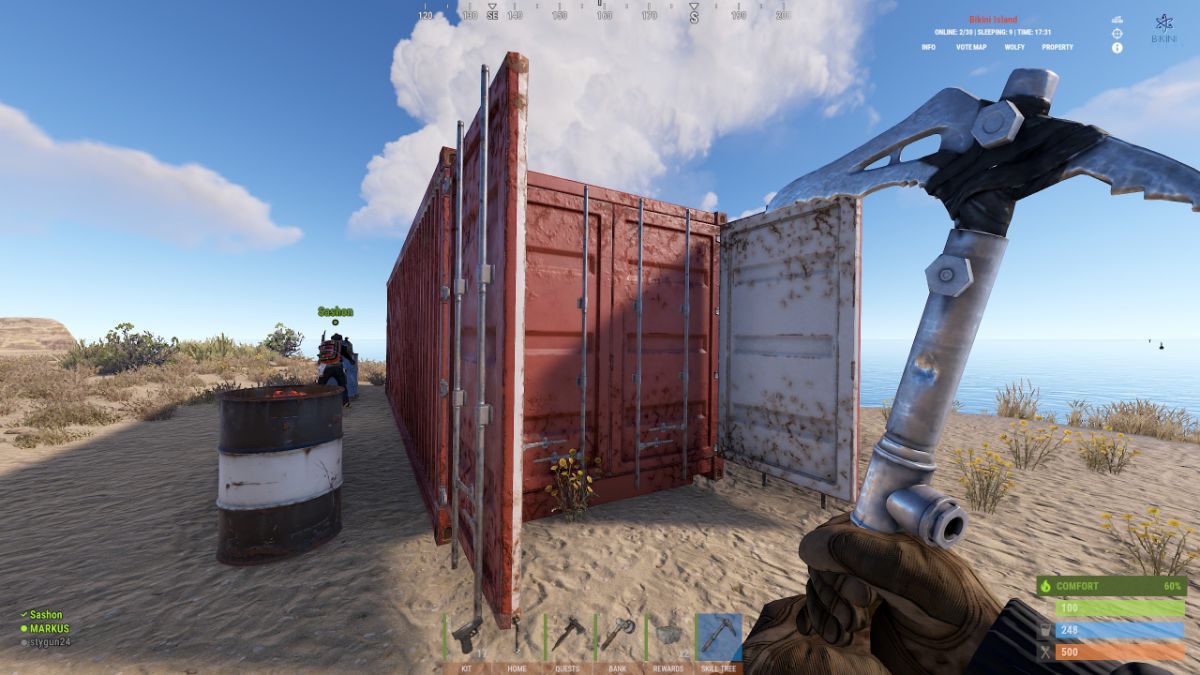
we encountered an grave issue : container when opening doors must be opened 10 times before getting the loot??????
please feel free to check my screeenshot and tell me if it can be fixed?
cheers from MARKUS and SASHON from Bikini Island.

 49 minutes ago, MARKUS said:
hey
we encountered an grave issue : container when opening doors must be opened 10 times before getting the loot??????
please feel free to check my screeenshot and tell me if it can be fixed?
cheers from MARKUS and SASHON from Bikini Island.
Use console command clearcontainers. What size map and send me your config setup.
-
It automatically detects if you are a admin, delete your current config and try fresh just to make sure.
For custom locations that are not monuments.
Get to the location you want a sleeping bag and use for example:
/setbag ArenaSpawn1
Then use (optional - for multiple spawn location per sleeping bag)
/setspawn ArenaSpawn1
(if you want to set multiple spawn points for when a player with permission respawns using that sleeping bag. You can repeat /setspawn ArenaSpawn1 at different locations to set multiple respawn points per bag.)
In config it will create that bag and you can change the ".use" permission and other options and reload make sure to grant the player or group the permission for each sleeping bag if the permission is new or different from others.
Then for another team (if its not a free for all arena)
/setbag ArenaSpawn2
and
/setspawn ArenaSpawn2
with different permissions and set options and make sure to create a group for each team and grant the sleepingbag permissions to the right groups.
-------------------------------------
For monument locations like oilrig or airfield, outpost etc just use
/setbag and /setspawn
(For monument locations don't include a name after the command /setbag and /setspawn)
-------------------------------------
I been working on a update for this plugin which will release soon but its fully functional as I currently use it on active servers and just made sure.
I'll update the details and description to provide better information real soon.
If you need any help shoot me a message on here or on discord RIPJAWBONES#0001
Would love to get this setup for you properly if you can't. -
Changed Status from Pending to Fixed
Changed Fixed In to 1.0.2
-
Are you using carbon?
This was fixed and tested by a few different server owners in version 1.0.2 we are not having this issue, send me your config
Add me on discord so you can show me how it happens for you.
RIPJAWBONES#0001 -
Changed Fixed In to 2.0.2
-
Changed Status from Pending to Not a Bug
-
1 hour ago, SHIFTlego said:
The Perms Option Is Not Working To Set The Default Group To outpostrespawn.use Can You Fix This?
Console Command/Output:
oxide.grant group default outpostrespawn.use
Permission 'outpostrespawn.use' doesn't existperms are in the config for each location example
outpostrespawn.outpost
outpostrespawn.bandit
outpostrespawn.use is no longer needed will add it back in next update -
For custom locations use /setbag "custom name"
/setspawn usage is only after you use /setbag command.
If you are using a custom location use /setspawn "same custom name you set for the setbag" -
Changed Status from Pending to Closed
Changed Fixed In to 2.0.2
-
Hey sorry missed something, update 2.0.2 has full fix, will ensure it wont happen again.
-
23 minutes ago, Asbo- said:
Never had this issue before you updated the plugin though. But I will try it again.
Let me know if fixes it for you
-
Just added additional safe guards to ensure UI is removed when player is alive. If you still have the issue after using 2.0.1 it has to be a conflict with another plugin you are using that is using "onplayerdeath" and is duplicating the players death.
-
Changed Status from Pending to Closed
Changed Fixed In to 2.0.0
-
Changed Status from Pending to Closed
Changed Fixed In to 2.0.0
-
Changed Fixed In to 2.0.0
-
Changed Status from Pending to Closed
Changed Fixed In to 2.0.0
-
4 hours ago, Asbo- said:
Hello,
I have a spawn point that is bugged out and players that spawn either outpost or bandit spawn in a doorway and it bugs them so they cant move.... they have to kill themselves to get out of it....
Is this a plugin fault?Update coming soon, current config will need to be backed up and deleted for the new version when its released.
Handful of changes and you will be able to set your own spawn locations if you don't like the defaults. -
Changed Status from Pending to Closed
-
Changed Status from Pending to Closed
-
Changed Status from Pending to Closed
-
Changed Status from Pending to Closed
-
Changed Status from Pending to Closed
-
4 hours ago, BaluDog Gaming said:
Ah wasn't aware the code was protected, I'm using Carbon framework. It won't support that? Or is it possible to have a version of the plugin without the protection to use?
Currently it will only work with oxide regardless protected or not. At the moment all my plugins are oxide as its shown next to the description. Eventually I might be able to switch.
-
Changed Status from Pending to Not a Bug
-
1 hour ago, BaluDog Gaming said:
Just bought and uploaded the plugin. But the contents of the file isn't valid? Just has a lot of this in the file.
Not a issue works and loads for oxide, codes protected.
-
56 minutes ago, Captn Shrek said:
great plugin but missing the new transportation methods
You can add any vehicles you want to the config using the .prefab path.
I'll add all the vehicles in the default config in next coming updates. -
48 minutes ago, Captn Shrek said:
a refund isnt necessary, ive swapped to oxide
Alright sounds good, I'm currently working on decent update its coming soon and then a UI update afterwards.
-
3 hours ago, Captn Shrek said:
im running carbon, not oxide, is that the issue? does this not support carbon? sux wasted money
Yea, I'll see if I can update it to work with carbon, if I run out of time and can't have it done soon I'll refund you.
-
Changed Status from Pending to Closed
Changed Fixed In to 1.0.8
-
Updated and fixed
-
5 hours ago, SlayersRust said:
I'd like to change the Icon that appears on the death screen that is currently a bed. Is it possible to change it to the Minicopter icon somehow? I seen on another server they did this.
Thanks for any help!
Don't think it's possible for minicopter icon unless it's a image over the bed, however it can be the Camper RV as that's a bed prefab, if you can send me a screen shot of the minicopter icon or server that you seen this on I'll check it out, but pretty sure it's not possible unless it's just a image over the current icon as I checked/tried before released.
-
Hey, we just tested with only the horse and it works fine.
Make sure you download the latest version as it looks like you have 1.0.4 downloaded latest is 1.0.5
Try this config{ "MsgSettings": { "Message Icon SteamID": "76561197960839785", "Message Prefix": "[VehicleSpawner]", "Message Prefix Color": "#5af" }, "Prefabs": { "Horse": { "AutoMount": false, "BlockButAllowInBuildingAuthorized": false, "BlockButAllowInSafeZone": false, "BlockInAuthorizedArea": true, "BlockInBuildingBlocked": true, "BlockInSafeZone": true, "BlockOnLand": false, "ChatCommands": [ "horse", "myhorse" ], "CooldownTimer": 180.0, "DisableUIButton": false, "FuelAmount": 0, "LockFuel": false, "Permission": "vehiclespawner.horse", "PrefabPath": "assets/rust.ai/nextai/testridablehorse.prefab", "Rotation": { "x": 0.0, "y": 0.0, "z": 0.0 }, "SkySpawn": false, "SkySpawnHeight": 50.0, "SpawnDelay": 10.0, "SpawnDistance": 5.0, "SpawnHeight": 3.0, "SpawnOption": 1, "UseTracks": false } }, "Settings": { "AmountOfPrefabsAllowedAtOnce": 2, "BlockNearPlayer": { "IgnoreTeam": true, "PlayerDistance": 5.0, "UsePlayerDistance": true }, "DestroyOnDeath": true, "DestroyOnDisconnect": true, "GlobalSpawnCooldownTimer": 10.0, "UseCombatBlocked": true, "UseRaidBlocked": true }, "UiPermission": "vehiclespawner.ui", "UsePermission": "vehiclespawner.use" } -
Pending, need video or error of how this happened.
-
When the player connects to the server it checks to see if they are dead.
When the plugin is loaded it checks to see if players are online and dead.
When the plugin is unloaded it destroys the UI.
When the player respawns it destroys the UI and buttons.
Even if you press f1 and bind kill to a key and respawn to a key it destroys it.
I use it on high pop servers with no issues.
If you can send me a video of how that happened or any errors I can help from there.
I tried many hours multiple days now trying to get that to happen and it would not, you are the only person with this issue.
The only thing I can think of its a conflict with another plugin you are using or your server was glitched out in some way.
However I can send you a custom version of the plugin with additional checks to ensure the player is alive and the UI will be destroyed, but it shouldn't be needed at all. -
Hello, How do I add multiple commands to 1 button ? I tried a few different ways didn't work, is it even possible?

Cannot spawn into camper bed
in Outpost Respawn
Posted
Update coming by tomorrow with this fixed